
How do I set up Google Analytics on my site to track my content marketing?
This is a common question every marketer asks, be it newbie or intermediate level. Like everything, online marketing and especially content marketing is not a set and forget process.
Have You Heard Of This Legendary Marketing Quote?
Half the money I spend on advertising is wasted; the trouble is I don’t know which half.
So said John Wanamaker, one of America’s earliest business pioneers. He was an astute businessman but unlike the modern digital age, at his time, he had no way of attributing his success accurately to every marketing strategy he implemented.
Tracking Your Content Marketing Strategy Using Google Analytics
You have worked very hard to set up the entire content marketing process on your site. It is time to set up Google Analytics on your site to keep track of the progress of all the work you have done. Without measuring the outcomes of content marketing, it is impossible for you to know whether you are achieving your goals or not.
Why Use Google Analytics?
There are innumerable reasons to support Google Analytics but you cannot beat the ultimate hook – it is FREE! It is an enterprise web analytics platform that you can start off with to track your site’s progress. You start off with a huge advantage of not investing $$ upfront.
Google Analytics (GA) is an industry standard analytics package with lots of advanced features in the free version. You can track visits, visitors, audience demographics, content consumption, setting goals to measure the successful Calls To Action (CTAs) and even e-commerce tracking – the revenue earned when you sell products online.
Google Analytics Insights As Easy As A-B-C
There are tons of out of the box reports that are intuitively easy to pull and understand. Google has taken it one step further by explaining the ABC aspect of reports – Acquisition, Behavior and Conversion. These are crucial in explaining the customer journey once they land on your site.
Acquisition
These reports explain how visitors ended up coming to your website. You could have a paid search campaign running in Google Ads platform. You have a couple of pages on your site ranking well on Google search engine results pages (SERPs) for long tail keywords which can be found within GA. This is natural or organic traffic. If you have your content going out to Twitter and Facebook accounts, these are sending social media traffic to your site.
Behavior
Once visitors land on your site, how do they behave? Where do they go? What types of content do they read? What actions do they take on the pages they visit? Behavior reports answer all these questions. It also gives a great idea of your site experience from the visitor’s perspective. How easy is it for your visitors to find what they are looking for?
Conversions
If your content marketing strategy is to get users to sign up for your newsletter or explain the special quality/features of your products to entice them to buy, then these are the conversions or business goals you want to achieve, the actions you want your visitors to take.
Setting up goals as thank you pages helps keep track of conversions accurately. These happen when a user signs up for the newsletter and ends up on the thank you page. After checking out when buying a product, the user is directed to a thank you page.
You can see these in the goal funnel reports. The sequence of well defined steps from the landing page to the final thank you page shows how users engage with your site, where they enter and where they drop off. It is an eye opener for most business owners.
Getting Started With Google Analytics
If you know to measure all your marketing activities via Google Analytics (GA), you are head and shoulders above the rest of your competition. True, there is some effort involved in understanding the GA interface. It can be intimidating to start with. Like everything else in life, familiarity breeds contempt. The more you spend time with it, the more you will reap the rewards in the long run.
To begin with, you need a gmail account to open a free Google Analytics account. Go and register at analytics.google.com
Navigating the GA Interface
Once you log in, you see a plethora of menus and sub-menus. Go through each of those sections carefully like Realtime, Audience, Acquisition, Behavior and Conversions as explained above. For a new site, you won’t see much activity.
As your content marketing and content syndication efforts grow, you will see more traffic. You can see all the different channels at work under Acquisition > Source/Medium
Google Analytics On The Go
GA interface is responsive. You don’t have to be tied to your desk. View it either in real time or over a period of time on your mobile device.
Google Analytics Implementation Determines Data Quality
For most business sites, Google Analytics comes with out of the box reporting which is more than sufficient. In some cases, the business needs may be such that customization is required. In such situations, implementation plays an important role. It is vital to know how GA works under the hood.
Installing Google Analytics Is Easy
Once you are logged in as site owner (or Administrator), you can click on the gear shaped icon on the left most side right at the bottom. It takes you to an Admin interface.

Now click on Tracking Info and then Tracking Code to get the screen below with the Javascript code for tracking. Paste this script into the global header or global footer of your site.
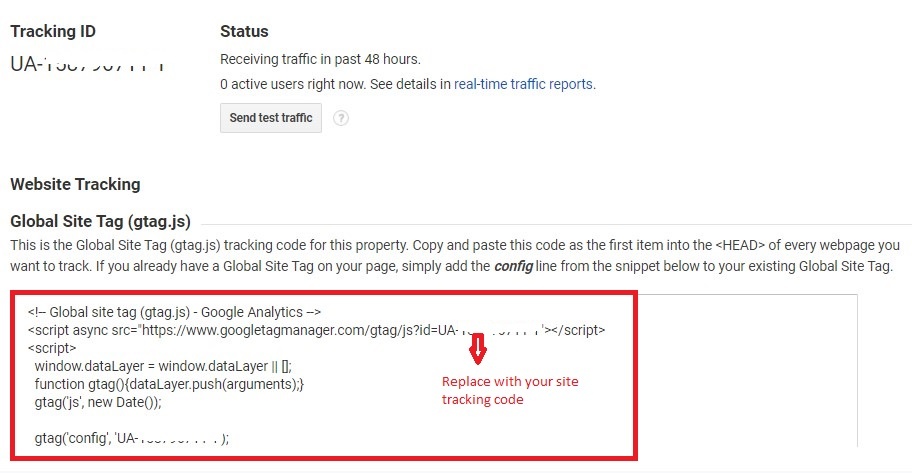
If you stick this tracking code on every page of your site, you should be able to see tracking data in your GA interface within 48 hours.
If you are using WordPress, in one of the previous posts, a great Google Analytics plugin for WordPress is listed. Check it out!
Google Analytics Beginners Course
If you want to really get a good handle on how Google Analytics works and reading the reports, you cannot afford to miss the top quality course on Google Analytics offered by the creator, Google at absolutely $0 cost. Make the best use of it.
Google Analytics Certification
If you are a total data nerd and want to be proud of your Google Analytics credentials, become certified by passing the <link>Google Analytics IQ certification exam The certification is valid for a year from the day of passing this.
As a small business owner, you have enough on your plate to run your business on a daily basis. We offer Google Analytics implementation services and get your site set up for reporting so you can get automated reports on a weekly, bi-weekly or monthly basis. Drop us a line or give us a call.
Related Posts












Leave a Reply