
What Tools Do You Use For Keyword Research?
It is best to start off using a free keyword tool to do your keyword research if you are on a shoestring budget or a novice or intermediate level user, looking to build your website.
Primary Purpose Behind Using Keyword Tools
Using an online keyword research tool is to find the top category keywords representing your niche. These correspond to short tail keywords (one or maximum two words). These have high search volume and equally tough competition for ranking at the top of Google.
Some niches can have several short tail keywords, all with high search volume. For a new site, start with 10 to 12 category keywords. Some niches may have only 10 or less head keywords. It comes down to the niche being targeted.
Create Keyword Groupings
The results from keyword tools have to be manually arranged in descending order of search volume. It is important to isolate the high volume category keywords. Interestingly, the keyword phrases that follow the high volume keywords generally have a common theme with those of the short tail keywords.
It is now time to manually group the keyword phrases into tightly knit groups. For this, it is best to export the results from your tool as an excel or csv file. You can then rearrange the rows manually and create tightly knit groups of common keywords, again arranged in descending order of search volume.
Identify Modifiers In Keywords
Modifiers are qualifiers that qualify an ordinary keyword phrase. On its own, web hosting is a well defined keyword term with an obvious meaning. If you look at keyword phrases like cheap web hosting, free web hosting, cloud web hosting, the prefixes here namely cheap, free and cloud are all modifiers as they add a qualifying factor to the web hosting keyword.
These modifiers or variants are typically of lower search volume and can be easily slotted into a category keyword like web hosting. It is unwise to target all of these three keyword variants in a single piece of content. Free can never be accommodated in any category. It can only belong to the free category.
Brand Name As Modifier
Your brand could be an established one offline. It is of late that you have decided to pursue online operations. In this case, do not ignore your brand equity. Use your brand name as a modifier along with the keyword that is representative of your niche.
Geographical Location As Modifier
If you have a local business, then local customers are your priority customers. Ensure you add your location to the content being created. Some other examples include local county, city, state and region.
Mapping Keyword Groups To Internal Pages
At the top level, you have the Home Page. Then you have the category keyword pages at the second level (Tier 2). Now create the internal pages at the third level (Tier 3) representing each keyword grouping. This is the content food the search engine spiders relish the most.
There may be cases where you may have so many keyword phrases in a single themed group. Do not overload a single page of content with all the keywords. Instead, create two separate pages to cater to the different keyword phrases coming under the same theme.
Popular Keyword Tools
The keyword research tools market has exploded in recent years. Doing a Google Search gives a listing of tons of both paid and free keyword software. You would be hard pressed to select one that suits your style and budget.
I am comfortable using the following keyword tools and am highlighting the pros and cons for each tool.
Google Ads Keyword Planner Tool
This is the grand daddy of all keyword tools in the online marketing industry. It has evolved so much over the years and it is in a shape and form that is very different from when it started. For this exercise, let’s keep it as simple as possible. The seed keyword is web hosting and this will generate other keyword ideas in this niche.
Pros of Using Google Ads Keyword Tool
- You get the keyword source straight from the horse’s mouth – in this case read Google.
- The keywords are specific to Google Paid Search and not organic seo.
- The data can be mind numbing with so many columns available when you download a report. To start with, it is best to restrict to keyword phrase, cost per click (CPC), search volume and competition.
- There are huge lists of keywords available to download for any niche and it takes time to categorize the keywords manually into tight knit groups.
- Save the best for last goes the saying. Yes, Google Ads Keyword Tool is totally free to use
Cons of Using Google Ads Keyword Tool
- Google has made it hard over the years to get access to this tool. It gives preference to users who create a Google Ads paid account. If you do paid search marketing on Google Ads, there is no problem.
- A big drawback is that the tool does not offer rounded values for search volume and competition. For web hosting, search volume is on a range of 10K – 100K on an average per month. Competition takes 3 values, high, medium and low. The final output has 1,442 keyword ideas.
HAT TIP: How To Bypass Google Ads Campaign Creation process:
For those who don’t run paid search campaigns, it is mandatory to sign up for Google Ads account and set an objective for your campaign. You can bypass this requirement as follows:
1) After logging into Google Ads, you will be asked to create a campaign
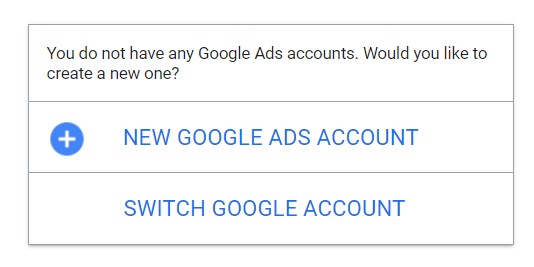
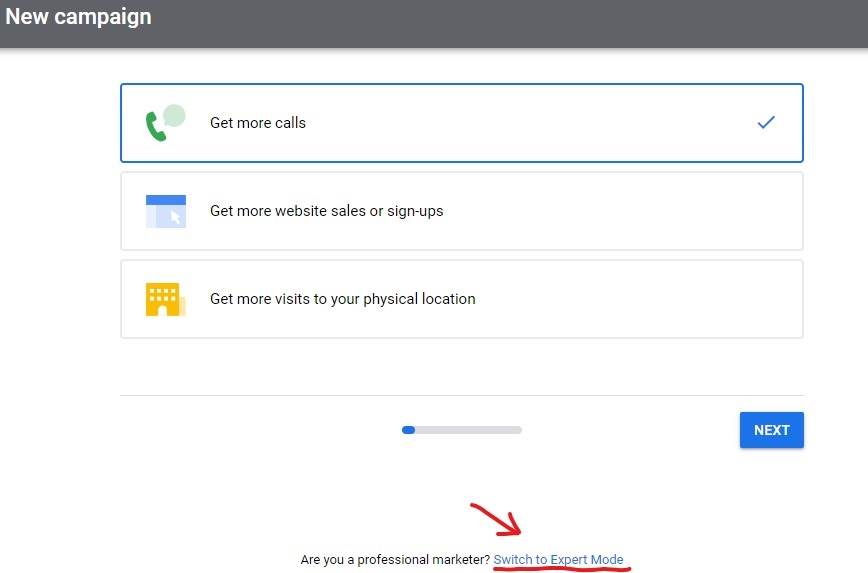
2) Click on New Google Ads Account. You will be taken to this screen. Scroll to the bottom and click Switch to Expert Mode
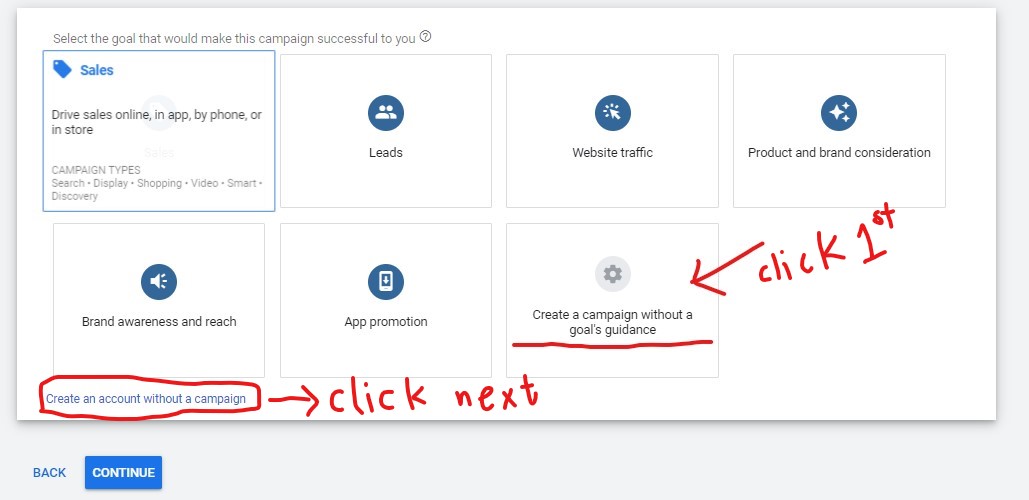
3) On the following screen, firstly, click the box with the gear icon that says – Create a campaign without a goal’s guidance. Secondly, below that, click the link that says – Create an account without a campaign. Click Continue
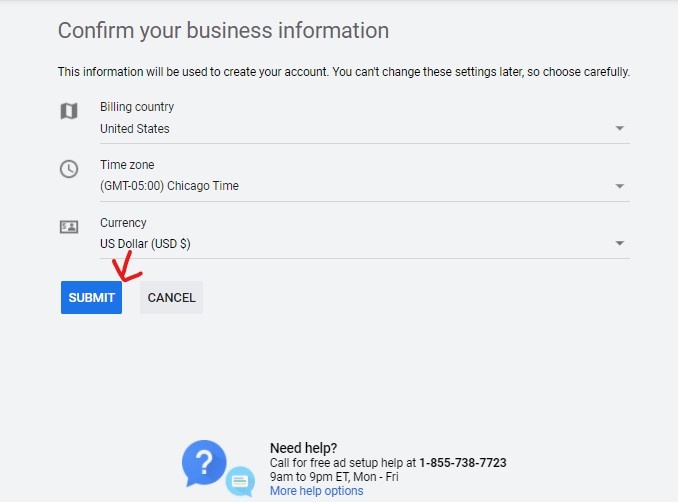
4) You will be taken to the Business Information Screen. Confirm that all the values are filled in appropriately. Click Submit
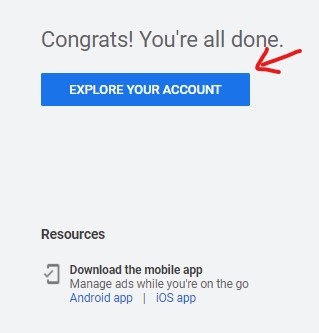
5) The next screen confirms you have created a free Google Ads account. Click on the Explore Your Account button.
6) In the next screen, use the seed keyword in our case, web hosting when searching for keyword ideas.
NOTE: You will see only a single wrench icon at the top, which when clicked, allows you to select the Keyword Planner tool. All the other features found in a standard Google Ads paid search account will be missing here.
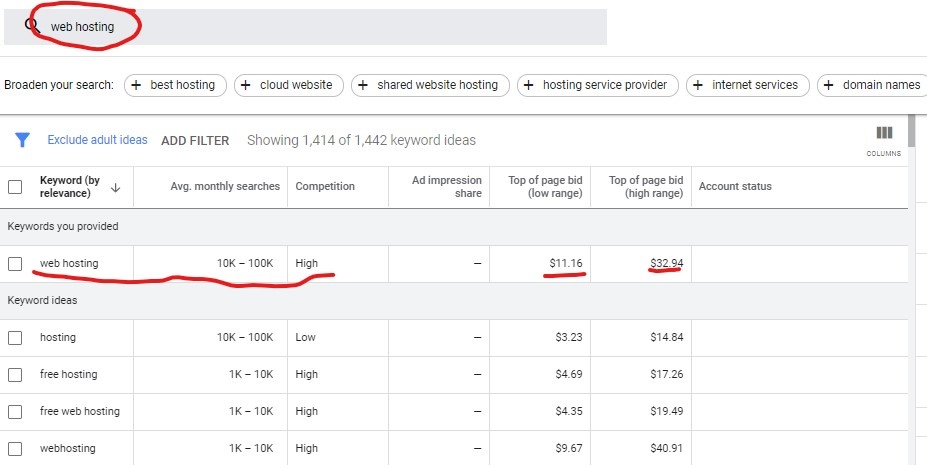
7) Export the list of 1,442 keyword ideas by clicking on the link on the top right of the page – Download Keyword Ideas. You can download it as a .csv file or a Google Sheet.
8) The keyword phrases with high search volumes are the top level category keywords.
Using UberSuggest Free Keyword Tool
UberSuggest Keyword Tool is a really good tool offered by Neil Patel. All you need is a free Gmail account to log in. There is a limitation on number of projects you can create.
The number of search results in the free version is limited. But it is enough to get a good idea of the head tail keywords and the medium and long tail keywords that need to be manually categorized. You get to create one project in the free version.
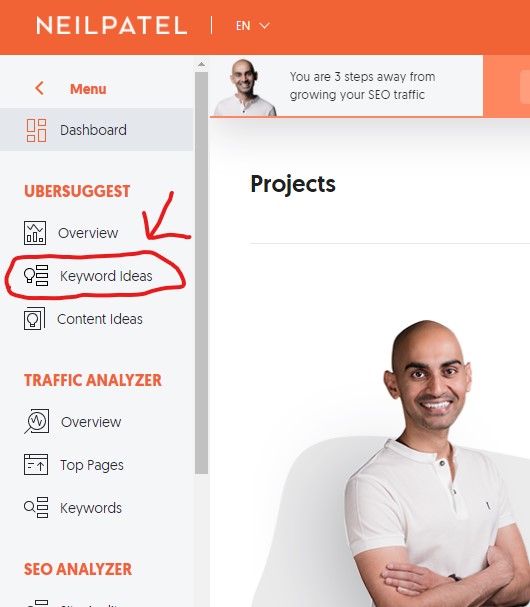
1) Once logged in, you are presented with this screen. Click Keyword Ideas.
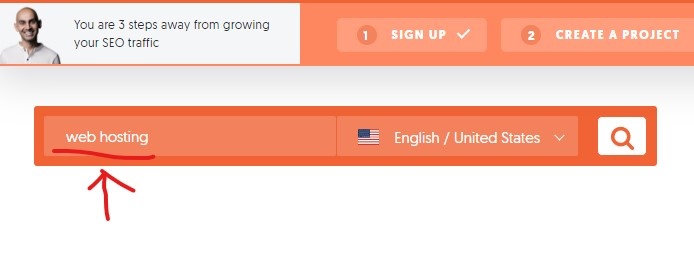
2) You are presented with this screen where you type in the seed word in the keyword box and click Search
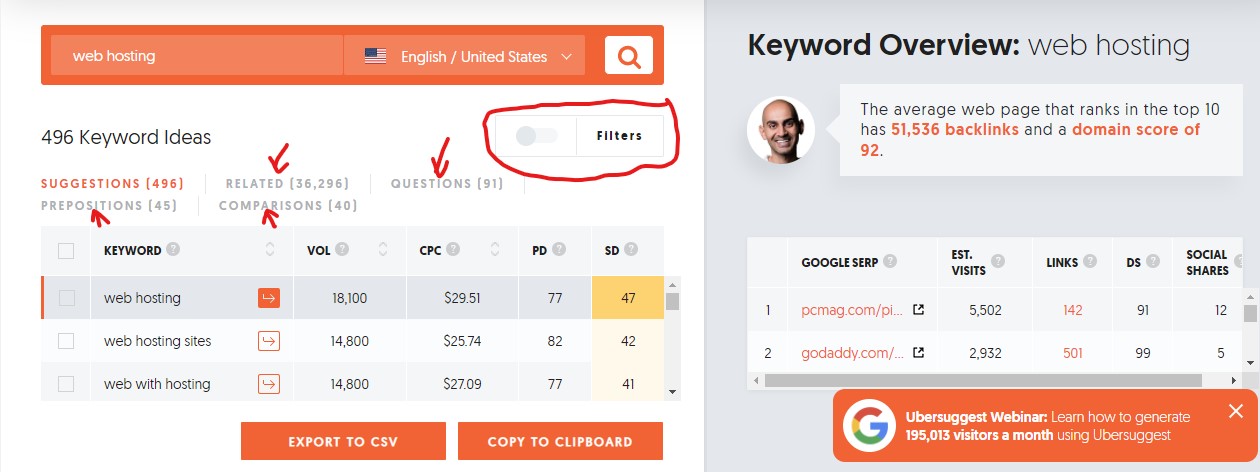
3) Now, you are presented with the final results. The interface is certainly intuitive and does not need much explanation. We get to export 496 keyword ideas along with their search volumes, cost per click (cpc), paid difficulty (paid search) and SEO difficulty (natural search).
Apart from Suggestions, you can see the different features marked with red arrows, giving useful information. You can click on Related to get related keywords.
Clicking on Questions shows the questions asked by users for the niche you are doing the keyword research in. Prepositions offer exactly the prepositions for the keyword phrase you are searching.
Finally, Comparison gives you searches made on comparisons between your seed keyword and some other related keyword which opens up completely new opportunities for creating new content.
Hovering over the ? beside each column name gives you the definitions. You can only set filters and apply it to 100 rows in the free version.
To the right of the screen, we have the organic search metrics for the web hosting head tail keyword. It shows the top 10 domains ranking on the first page of the Google SERPs in the free version. This gives you an excellent idea of the competition you are up against.
Click on the Export to CSV button and download the keyword phrases and associated metrics for manual sorting into categories.
UberSuggest Chrome Extension:
The UberSuggest keyword tool Chrome extension is a nifty tool that you can use to your heart’s content for free, without any limitations. Only when you click keyword related questions, prepositions and comparisons, you are taken to the free version of the UberSuggest keyword tool and you can get enough information with a free account.
Using UberSuggest Chrome Extension
First, download the free UberSuggest Chrome extension
You can watch the video from the creator, Neil Patel who clearly explains the use of this nifty Chrome keyword research tool extension.
My Keyword Research Process Examples
I will post below a few examples of how I sort the web hosting keywords into tight knit categories.
Example 1: Seed keyword is top category keyword
Web hosting has the highest search volume per month. On manually reorganizing the group, these are the results I got. I have grouped the generic web hosting terms together with a related question – what is web hosting
If you are building a new website, you would be well advised not to target these keyword phrases as the top 10 sites are web dinosaurs and competing against such heavyweights with high domain authority and backlinks is extremely difficult.

Example 2: Keyword Group Theme Is Hosting Company
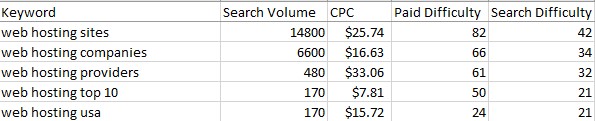
This is a group of generic hosting companies with search phrase containing synonyms for companies. You can say these are related terms in Google parlance.
Example 3: Keyword Group Is For Free Web Hosting
In any industry, it is obvious that promoting a free product generates no revenue. Why would you even want to do such a thing in web hosting?

Well, not all industries are the same. With web hosting, these free hosting companies are ideal for a rookie to get his/her feet wet. This is a good way to practice setting up your website and learning the tricks of the trade.
When your traffic starts growing, then it is high time you looked for a paid hosting plan. Your first inclination would be to turn to the free hosting provider as a sign of gratitude and grab one of those hosting specials they will keep bombarding you with all the while you are on a free plan with them.
For affiliate marketers, this is a golden opportunity as they can get rookies to sign up for a free hosting plan and then onsell a paid plan once their site gains traction. The affiliate marketers earn money on the backend for the life time value of the customer with the hosting company the novice has signed up for.
Avoid Obsessing Over Keyword Phrase
Do not attempt to be myopic by loading up your content with the keyword phrase that is the focus of your article. Just repeating it over and over in parrot like fashion is going to attract a penalty from Google. Be WARNED!!
Write naturally with your human readers in mind. Do not focus on writing for the search engines. At the end of the day, it is a human who is going to buy your product or service and not a search engine bot.
When you are an expert in your domain, you will tend to write naturally and will insert niche relevant keyword phrases naturally as they form an integral part of the content you are creating for a particular subject in your niche.
Use Related Keywords Or Synonyms
It cannot be stressed enough – use related keywords and/or synonyms regularly in your content. Have as many variants as possible.
In our example, hosting on its own can imply hosting a website. But hosting can also mean playing host to friends, relatives or guests. The search engines can get better context when web hosting is used together.
A good set of synonyms for the seed keyword would be online hosting, cyber hosting, hosting sites, domain and hosting accounts and so on. The user intent is strong with such keywords and Google serves up high quality most relevant search result to its users for a great user experience.
At Traffic Alignment, we provide awesome small business content marketing services at a very affordable cost that involves a flat fee per month plus a nominal paid media ad spend. Give us a call today to help us shore up your small business’s online presence.
Related Posts







Leave a Reply