
What Is On Page Optimization?
On page optimization is the process of optimizing the headline, the html tags (title tag and the meta description) and page content to give search engines a good understanding of your site content and to a certain extent, help your site rank well in the search engines, giving your site a bump in organic traffic.
Why Is On Page Optimization Important?
It is important for search engines get a clear idea of what your site is about, giving your site a better chance to rank for relevant user search queries at the top of Google search listings.
On Page SEO In Context Of Rankings
Let’s be honest here – the on page factors on your own site are something you have total control over. Just optimizing all the tags to the best possible level and waiting for your page to zoom to the top of the Google rankings, is wishful thinking at best.
It’s not my intention to be so brutally honest. The truth is that off page factors (like backlinks, social mentions etc) that are outside your or your site’s control constitute the bulk of the ranking power. As a site owner, you cannot influence such factors.
No On Page Factor Can Be Exploited
Early in the day, there were tags like meta keywords (which I have not even mentioned here and no one even talks about nowadays) in the <head></head> section which allowed users to slot in relevant keywords for which that page was optimized. This ended up in keyword stuffing (both visible and invisible text) that the search engines just ignored it.
It was the same case with EMD (Exact Match Domain). If your site specialized in selling bicycle seats, then the EMD would be buybicycleseats.com This proved to be such a powerful ranking factor that domaining businesses flourished for a while peddling in EMDs. Doing this today either makes no difference to site ranking or can be considered a negative factor.
What Are On Page SEO Factors?
These on page factors apply to different elements that constitute the web page structure, those that can be seen by users and some that cannot.
The HTML Tags
Browser Title
The <head></head> section of the web page’s underlying HTML code contains the Title tag. This is what appears on the browser title and not an element of the actual web page.
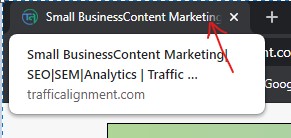
This Title also appears in the Google search listings as the clickable link.
Title And Meta Description In Search Listing
The Title (numbered 1 in screenshot below) is an important tag that has to be restricted to a maximum length of 65 characters. It gives both search engine bots and the humans an idea of what the page’s subject matter is about. It has to be sensible yet attractive enough to get the user to click on it and arrive at the site.
If you are a well established business, with brand equity, you can start off the title with your brand name and then the main niche keyword your site focuses on, separated by a | (pipe) character. If you are a new business, it is prudent to start off with your main niche keyword phrases and ending in the brand name.
The Meta Description (numbered 2) is a tag that appears between the <head></head> tag and is not visible to the users. It accompanies the title tag in a search engine listing. The meta description should not exceed 155 characters. It should ideally express a benefit with a clear call to action.

NOTE:
It is best practice to write a meta description for a page of content that encapsulates what the content is all about and at the same time making it attractive to invite the user click.
Google is so advanced that even if the meta description is missing, it can choose an appropriate snippet of text that matches the intent of the user’s search term and displays it on the fly in the search listings.
Robots Meta Tag
This tag also appears within the <head></head> section. The robots meta tag is a powerful tag that allows or blocks the search crawlers from indexing that page.
For example, <meta name = “robots” content = “index, nofollow”> tells the spider to index the page but not to follow any links on that page.
<meta name = “robots” content = “noindex, follow”> tells the bots to not index the page and yet follow the links on that page.
Crawl Permissions Using Robots.txt File
Normally, most sites have a robots.txt file that can be accessed easily by going to www.mysite.com/robots.txt. The search spiders, for the best part, obey the crawling directives in this file, telling them they have permission to crawl certain parts of the site and blocked from crawling others.
The directives, for example, could be statements like
user-agent: *
Disallow: /members
Disallow: /downloads
Disallow: /admin
Possible Drawback Of Robots.txt
From the robots.txt file, hackers know the folder structure on your web server. This in itself is not a security threat. The file shows the private areas of the site that are not linked to, on the actual site itself. If these areas are not secured by you, the site owner, then hackers can sniff out possible vulnerabilities (in the case of storing sensitive information on the web server).
Google Search Console Verification Meta Tag
You can verify site ownership using a verification meta tag that Google offers. The user agent that does this verification is called Google-Site-Verification. If you opt for this verification method, you will get a verification string. You enable it within the <head></head> tag on your site as follows:
<head>
<title>Your Page Title</title>
<meta name=”google-site-verification” content=”your verification string”>
</head>
What Is The Most Important On Page SEO Element?
Content, without a doubt, is the most important on page element, if it can be considered that way. The quality of content plays a crucial role in the final ranking of the site.
E-A-T (Experience, Authoritativeness and Trustworthiness)
If your site displays good dose of E-A-T, then the written content would be an ideal indicator of experience and authority on the subject matter. Let’s go by Google’s own Quality Raters’ Guidelines (QRG) wherein Google discusses at length discussions on the E-A-T concept that helps in the final ranking.
This has been well documented in this article by Marie Haynes on E-A-T
Content Hierarchy
Reading gets easier on the eye when the content is split into well defined hierarchy using different font sizes for headings, grouping content suitably under headings and sub-headings and generous white space separating the paragraphs.
It goes the same for web pages. The title of the article on the page is usually a <h1> tag. It is best practice to have only one h1 tag on an entire page. You can have a few <h2> tags depending on the sub-headings and then any number of <h3> to <h6> tags. Headings are more of usability than ranking factors.
A host of other content related factors like anchor text, home page, category pages, money or destination pages, site maps and internal linking have been discussed in the previous post titled Website Structure Is Important For SEO Success
Use Of Structured Data
The goal of search crawlers when crawling a site is to get a good understanding of the site’s content without spending too much time. This is where Structured Data plays an important role in helping the crawlers understand what the page is about and also help certain features stand out in the search engine listings.
What Is Structured Data?
Structured data is a taxonomy or in simple speak, collection of objects. Each object is of a specific type with its own unique properties. These objects can be ratings, recipes, job board listings, product listings, service features etc.
Google, Bing and other lesser known search engines all give importance to Structured Data. They expect structured data to be either in schema.org format or JSON-LD format (name:value pairs). There are rules to be followed when setting up a structured data object.
Creating Structured Data Object
To create your own structured data object, visit Schema.org
Let us consider Google’s example of a JSON-LD structured data snippet appearing on a recipe page.
<html> <head> <title>Party Coffee Cake</title> <script type="application/ld+json">

{ "@context": "https://schema.org/", "@type": "Recipe", "name": "Party Coffee Cake",

"author": { "@type": "Person", "name": "Mary Stone" }, "datePublished": "2018-03-10",

"description": "This coffee cake is awesome and perfect for parties.", "prepTime": "PT20M" }

</script> </head> <body> <h2>Party coffee cake recipe</h2> <p> This coffee cake is awesome andperfect for parties. </p> </body> </html>
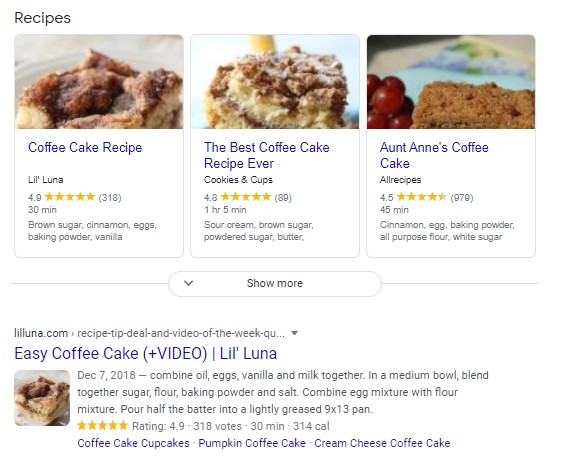
It is a recipe of A Party Coffee cake. The author of this recipe is Mary Stone, the date when it was published and a brief description. If relevant to a user search term, Google will display this as a rich snippet on the search engine listings.
How A Recipe Rich Snippet Appears On Google SERPs
WordPress Structured Data Plugins
RankMath has a great free structured data markup feature for a few different types of objects.
For a really comprehensive structured data plugin, with schema for different taxonomies, you cannot look beyond
Schema Pro WordPress plugin. This is a paid plugin that keeps up with all the changes that occur in schema.org
Free Structured Data Tools From Google
The Google Structured Data Markup Helper helps create JSON-LD structured data markup.
Google Structured Data Markup Helper
You have to login using your Gmail account. Once you are logged in, you see this screen. I have used an article as example in this case. I select the radio button Articles. I enter the URL of the article at the bottom and then click Start Tagging.

On the next screen, choose the title of the article – Free Keyword Tool for SEO in this case – highlight it. Then map it to the field name from the menu on the right. You have successfully marked up the title of the article.

You can see the Name field showing the title of the article. For elements that are not visible on the page, you can click on the Add Missing Tags.
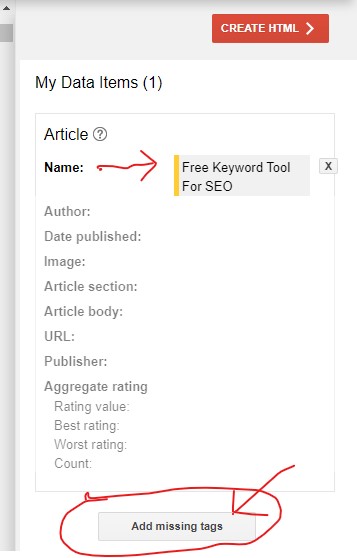
Select URL from the drop down and type in the URL of the article

Now, click Create HTML button
On the next screen, ensure you select JSON-LD from the dropdown and click Download – markup.html file is downloaded to your hard drive.
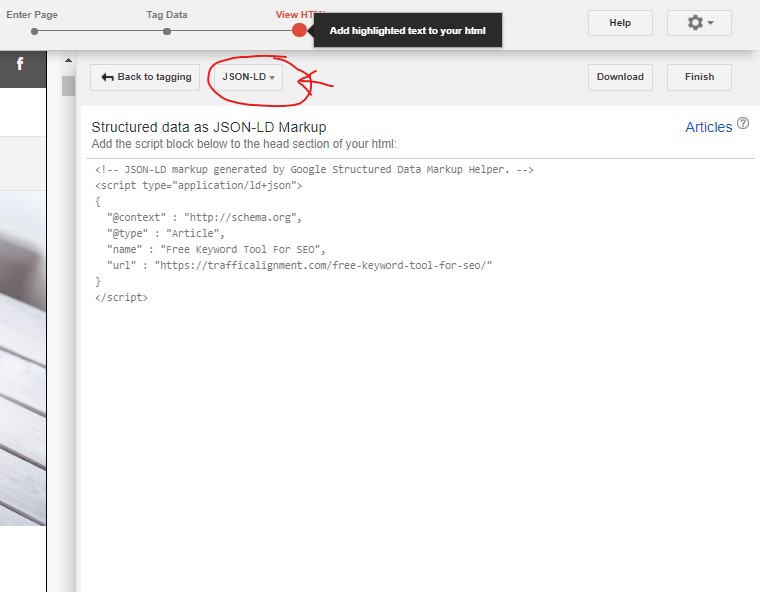
Now click Finish. Google gives you further instructions on how to test this markup. You are done marking up this article page. You can also copy the JSON-LD code and paste it into the html code on your page.
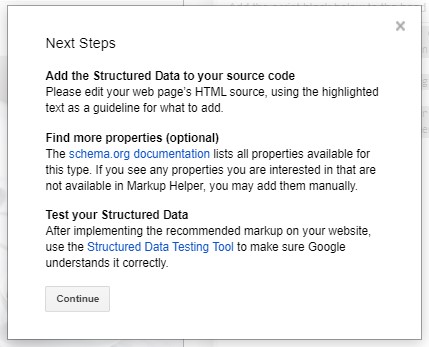
Google Rich Results Testing Tool
This is a free tool from Google that allows you test your marked up data. It is pretty easy to use and helps correct any errors. Click the above URL .
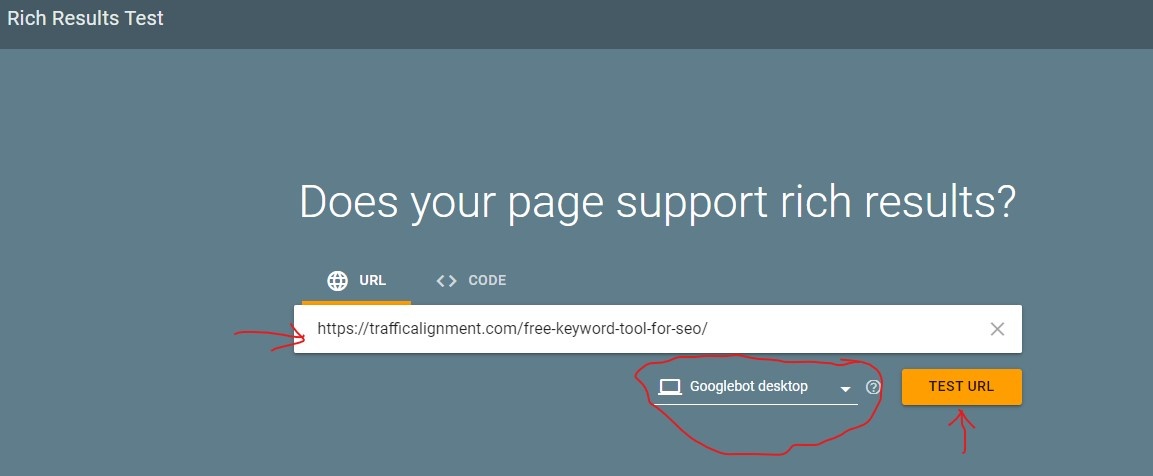
This takes you to the Rich Results testing screen. I input the article URL. I choose Google Desktop Bot (you can choose Mobile bot as well) and click Test URL
This leads to a page with final results. Enclosed below
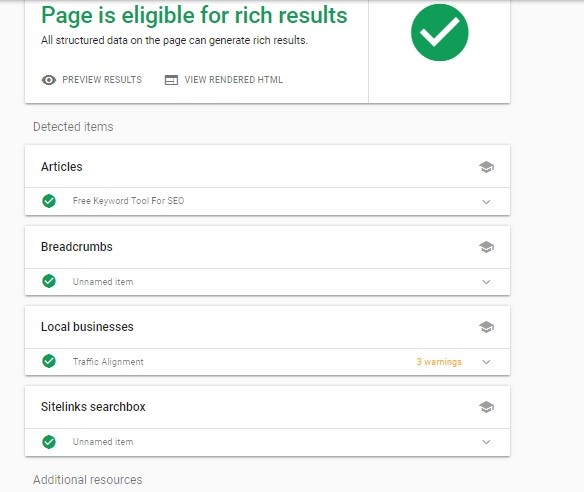
The rich snippets testing tool helps troubleshoot markup related problems and is extremely helpful.
HTML Validation
You may wonder – Is HTML validation relevant today? It is not a gamechanger. But it does not hurt to run your page markup through the W3C Markup Validator or the W3C CSS Validator
It costs $$$ for the search engines to crawl the web, of which your sites form a part. Make it easy for the crawlers to get to the meaty sections of your site. Validating the markup is a good way to help bots crawl your site efficiently.
Page Load Speed
This is not an on page factor by any chance. Google has clearly indicated that page load speed is a crucial factor for ranking. It makes absolute sense when thinking from a user’s perspective.
A site has done all the hard work and is ranking on page 1 of the Google SERPs. Imagine a user clicking the listing and landing on the site, only to be confronted with a blank screen. Users today have no patience to sit and wait. They are gone before the site starts to load.
There are several factors, mostly technical, that slows down a site’s page load speed. I am focusing on two important issues below.
Image Optimization
Unoptimized images of high resolution are major culprits in most cases. A jpg file extension is much smaller file size than other image formats.
If it is a WordPress site, your best friend is Smush It optimizes and resizes the images without compromising on quality. It also enables lazy load to help improve page load speed.
Javascript Optimization
Javascript and jQuery are awesome to work with for dynamic websites. If used incorrectly, they can block the page from loading and cause bad delays. Ensure the javascript is optimized.
For WordPress sites, Autoptimize is a cool plugin that aggregates, minifies and caches scripts and styles. It can make a major difference to your page load speed.
Javascript optimization also helps with tracking browser compatibility issues. The page may display perfectly on Chrome but not that well on Internet Explorer.
Here at Traffic Alignment, we focus on helping small businesses with their content marketing needs, aided by a minimal social media ad spend that gives better visibility on the search engines and increases targeted traffic to the site. Contact us today!
Related Posts








Leave a Reply