
What Is Site Structure?
A website is only as good as its structure in that users who visit the site will be able to navigate through the site only if there are well defined pathways.
If the user lands on the home page, then the global menu helps her go to the other parts of the site from the home page and also dig deeper into the site where the rich content resides.
The site home page is akin to the foyer in the house, the gateway to the rest of the house. Then the visitor is ushered in from the waiting room into the living room and then gets a tour of the bedrooms, the den and other more private areas of the house.
Why Is Site Structure Important?
A website structure, unlike a house, serves a twin fold purpose. It has to cater to both the human visitors and the spiders who crawl the site. The former contribute to the success or failure of a site whereas the latter are automated bots, vital in getting the site found on the world wide web so humans can visit the site.
I am focusing initially on how site structure influences the human visitors and following it up from the web crawlers perspective.
Make Your Site Human Friendly First
I am a vocal proponent of building the site to make it easily navigable for humans. A user who lands on the site should be able to move around the site intuitively with minimum effort.
As a site owner, it is your duty to provide your visitors a hassle free experience, by simplifying the site structure, have a global nav menu, splitting the site into categories and related sub-categories and most importantly have a site search feature.
In some cases, you may need sub sub-categories in the case of ecommerce sites where there are so many variations in products that they need to be grouped further.
This pleasant user experience ensures your first time visitors turn into repeat visitors and visitors keep coming back for more. Increased conversion rates keeps both buyers and you, the seller happy!
NOTE: It is only a human that is going to buy your product/service. If your site can fulfil the user’s expectations to the fullest, your site is a winner.
How Do You Create A Site Structure?
In-depth keyword research is the starting point that answers this question. Keyword research done right uncovers the vagaries of every niche to its fullest extent.
Keyword Research For Effective Site Structure
You get a great idea of the top level category keyword phrases, then the medium tail and long tail keywords of lower volume all gravitate to each of the short tail category keywords. They can then be rearranged into tight knit keyword phrase groups.
This whole process was explained at length in previous blog posts. After explaining the important factors influencing site structure, towards the end of this article, let’s dwell on the web hosting example, discussed in the previous seo topics, namely Keyword Research for SEO and Free Keyword Tool for SEO .
Determining Global Navigation
The Home page is always going to be the starting point for any website. It is also the most powerful page on the entire website. The different short tail keywords are the various services/products under the menu item Services or Products. These are the second tier pages, apart from the usual About, Contact and Blog menu items.
Keyword Research For Effective Content Hierarchy
As the global navigation takes shape, the content that goes into each category and sub-category pages is also determined by the same keyword research.
Content hierarchy is now well established and flows down from the Home page at the top down to the second tier category pages and the third category money pages (product pages for ecommerce site) or third category informational pages (for services sites).
The Home Page
In general, this is the most visited page on all websites. Visitors enter through the site via the home page. Sites with awesome content structure have the category pages and third tier destination pages rank well on the search engines through which visitors enter the site. These are often called landing pages. The ranking power or link juice flows from the top home page to the other pages on the site.
Category Pages (Second Tier)
The category pages are linked from the home page. They contain listings of categories. For a site selling books, the categories can be romance, war, western and Sci-fi. Each category will have more links to individual genre of books.
Category pages prove to be the crucial intermediary, aiding users to dig deeper into the site, to the third tier pages.
Money Or Destination Pages (Third Tier)
For services sites, these are the content rich pages where the service’s efficacy is marketed and its accompanying benefits and price comparison with other similar providers.
For ecommerce sites, these are the money or product pages with product description, discounts, warranty and other associated information.
Destination or money pages should ideally be two levels deep from the home page. Most sites should have their user needs satisfied at the third level. All these tiers are from the human perspective to get a better understanding of the site structure.
Do Not Manipulate Natural Site Structure
When RagePank (sorry PageRank) was the order of the day in the first decade of 2000, Google’s transparency in revealing the working of PageRank and the role it plays in final ranking of sites, almost led to its downfall with SEO professionals, spammers and everyone in between, exploiting the search algorithm.
At one point of time, the top 10 results for most niches were worthless spammy sites providing no value. This left users frustrated with Google facing a backlash over their inability to provide quality search experience to their users by surfacing relevant search listings on the SERPs.
Google had to restore order through Panda and Penguin updates in 2011 and 2012 respectively and maintain the sanctity of their search algorithm. Since then they have not been explicit in their communications related to their algorithm. PageRank is very much at play even today, though we do not know to what extent.
Site owners and others using SEO techniques manipulated the site’s internal structure by using a practice called link sculpting by which link juice from the home page was prevented from flowing to visible second category links using javascript link masking techniques and other unfair and unnatural practices.
This was to preserve the link juice flowing from the home page and directing as much of it as possible to the third tier content rich or money pages, to enable them to rank well on the search engine listing pages. The second tier category pages avoided linking to each other to avoid wasting link juice.
Retain Natural Site Structure
Let Google decide what pages are fit for ranking to users’ search queries than us meddling and trying to distribute link juice to pages we want to rank. The Google algorithm today is extremely sophisticated and can smell a rat if such unnatural practices are indulged in. One can win for a while but not before Google catches up and decimates the site.
Now that we have discussed the importance of site structure for optimal usability from a human perspective, it is high time we discussed the findability of the site from a search engine bot’s perspective.
Site Structure From Spider’s POV
My strong belief is that if user related features like site usability, ease of navigation that is intuitive, clear flow of hierarchy, both site and content wise, are all given importance and optimized for, it is only natural that search engine bots should find it easy to spider through the site.
Site Internal Linking
Ideally, the basic linking structure is set up when you create the global navigation menu. The menu ensures that top level pages are reachable from any page on the site. The category pages are also reachable in just one click from the home page.
On the category pages, it is your responsibility to link to your destination pages. Having links from home page to third tier pages is unintuitive as there is a break in the chain, the lack of second tier pages that provide the extra help in appealing to the human logic.
Contextual Linking
When you have content both at the category page level and money pages level, often you reference another category or another destination page in a very natural way as these links are contextually relevant to what you are writing about.
If you noticed, in one of the sections at top of this blog post, I referenced a couple of articles on keyword research when I was talking about it in the context of site structure. This is a natural way to link to contextually relevant sections of your site.
Anchor Text Is Vital
Anchor text is the text used in hyperlinks that you create contextually or deliberately to take the user to a new section of the site.
The words are very important for search engine bots, when they are crawling the site home page. Finding a bunch of category page links with meaningful anchor text gives the bots a great clue on what the likely content on those pages being pointed to, is going to be.
Even if the crawlers have time only to crawl the home page in that visit, they take note of the hyperlinks and schedule them for a future crawling session, with a decent idea of the content they have to crawl in the process.
Site Maps
Sitemaps were the flavor of the day since the early inception of the web. It was a mandatory best practice to establish a sitemap (normally in the footer of the home page) so that the spiders could follow all the links on the sitemap and crawl various portions of the site.
Today, especially with WordPress being the most popular CMS, there are awesome WordPress SEO plugins like RankMath and Yoast that automatically create the sitemaps. You can access the sitemap url from within the plugin interface and copy it. Then visit Google Search Console and Bing Webmaster Tools respectively. Both have a facility that allows users to submit sitemaps. Paste it in the relevant sitemap text box and click Submit for your site to get crawled.
Indexation Is Queen If Content Is King
It is appropriate to refer site indexation as queen (just as queen is the most powerful piece in chess) side by side with content. It is good to obsess over site indexation for the following reasons:
- Every piece of content you create on the site first has to be crawled by the search bots. If the quality of content is up to Google’s standards, it will become part of Google’s massive index (giant database of the cyberworld’s pages in trillions).
- Only after successful crawling and indexation (covered in my earlier post on How Do Search Engines Work), you can even dream of ranking on Google Search Engine Results Pages (SERPs). No indexation means no way of ranking.
Indexation And Virtual Real Estate
In real life, we talk about millionaires who made their money in real estate. They are the real estate czars who own extensive chains of commercial property as well as prime residential real estate. Their wealth arises from the number of properties they own.
Similarly, on the web, you want to rank for several long tail, medium tail and short tail keyword phrases in that order proportional to time. If your content caters to various keyword themes, you end up developing a lot of virtual real estate, in the form of different web sites.
Only if all these pages of content are indexed by Google and Bing, you can expect users to know about your sites when your sites rank at the top of the search listings. This increases the traffic to your sites and leads to many other good consequences.
The more virtual real estate you own in your niche, the more of a baron you become in that niche. Based on domain authority and trust rank, you will dominate the niche with all the indexed pages that you are able to rank successfully.
Google Search Console And Bing Webmasters For Accurate Indexation Stats
When you login to your Google Search Console account and Bing Webmasters account, you can check on the indexation of your site content to get the most accurate picture which only you, as the site owner, is privy to.
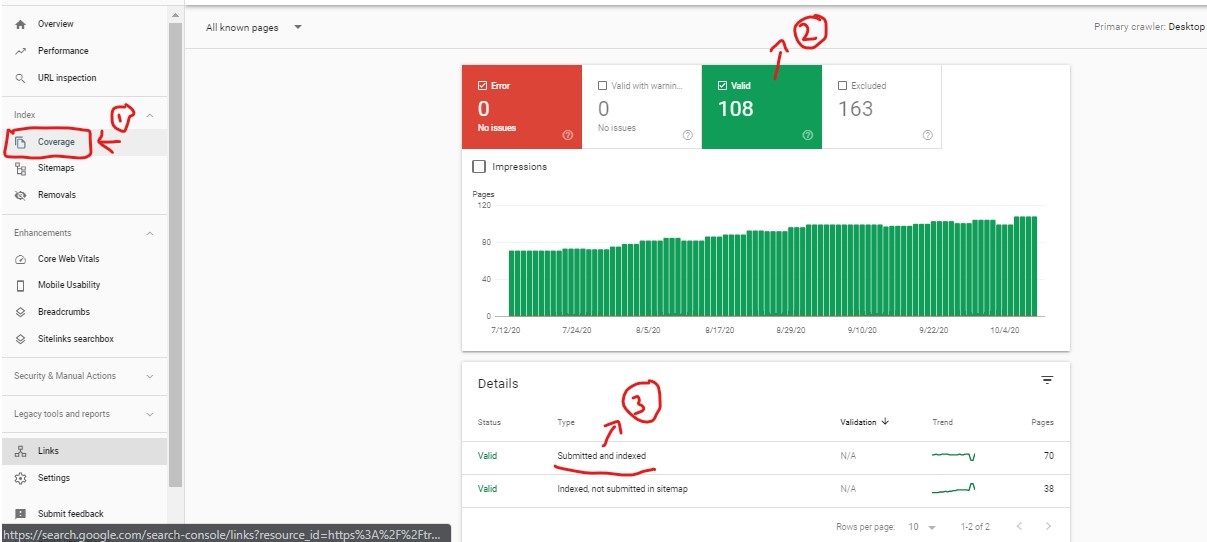
In the following screen shot, the steps are marked in numbers. After logging in to Google Search Console, click on #1 titled Coverage.
Then click on #2 that shows the valid URLs from your site that are indexed.
To see the actual URLs, click #3 that show the submitted and indexed URLs in Google Index.
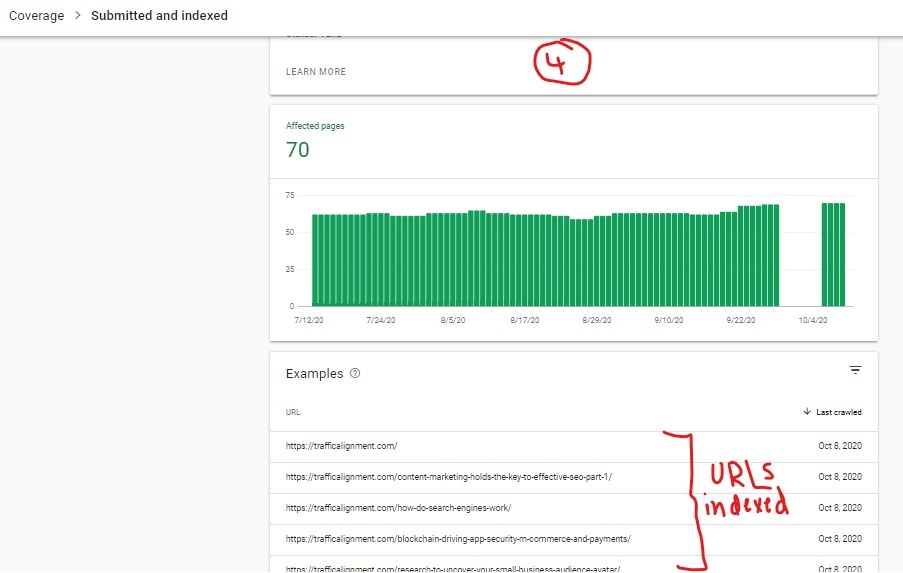
The indexed URLs living in the Google index is what you get in the screenshot below marked #4.
Quick Indexation Search
For a quick check, go to Google.com and bing.com and type in the command
site:yourdomain.com This gives an approximation of the number of pages indexed but it is not accurate on purpose, lest your competitors are spying on your site.
Keyword Cannibalization
When you get a page of content on your site indexed and well ranked for a specific keyword phrase, you have to make sure you don’t make this page compete with its own category page or other similar pages on the site.
WordPress Notorious For Content Duplication
Duplication Caused By Categories In WordPress
Site structure again plays a role when determining how you set up your WordPress site. When you write articles on various topics, ensure that each article fits uniquely under its own unique category.
Bloggers often end up creating similar categories and marking articles common to two different categories. This is a major headache for the search engines as there are multiple candidates competing for the same search phrase, with duplication being rife at the category level.
Duplication Caused By Tags In WordPress
It is best not to use tags unless it is a unique value for every post you create. For example, if you have a site on different vehicles by different auto makers, then you can have Categories for different brands as in Honda, Toyota, Audi, GM, BMW etc. Tags can be the different vehicle types like Sedan, SUV, Crossover, Coupe etc.
A combination of every category and every vehicle type will still make it unique and users who are interested in convertibles will see a tag page with different brand convertibles listed. If you do not have this uniqueness, tags can wreak havoc for the search engines in the context of duplication, leaving them in a quandary as to which page to choose for ranking amidst the numerous competitors.
If the search engines cannot determine the best page to rank for a user search term, then they tend to show the category pages. This is a poor example of site structure not doing its job, that is, serving up destination or tier 3 pages that are highly relevant to the user search phrase.
Determining Site Structure Problems
Use Crawling Tools
Depending on the number of pages on your site, if your site has less than 500 pages,
use a powerful free tool called Screaming Frog to crawl your site and find out errors like 404 page not found, 302 redirects etc.
If your site is much bigger, Xenu Link Sleuth has been around for ever and thankfully, their service is free. It may not be a comprehensive crawler like its other paid counterparts. It can find broken links and other associated issues.
Using Google Analytics To Find Site Structure Problems
From day one, make sure your site is tracked using Google Analytics.
Login to Google Analytics and view the data under Behavior > Site Content > All Pages. The pattern of content consumption across your various pages can be an eye opener.
Ensure that there is traffic flowing to your third tier destination pages. If for some reason, the third tier pages are missing, then it is time to wear your investigative hat and look at possible flow disruptions in the site structure.
You can see the top 10 pages listed by descending order of pageviews. You can also see the average time on page, the entrances, the bounce rate and % exit.
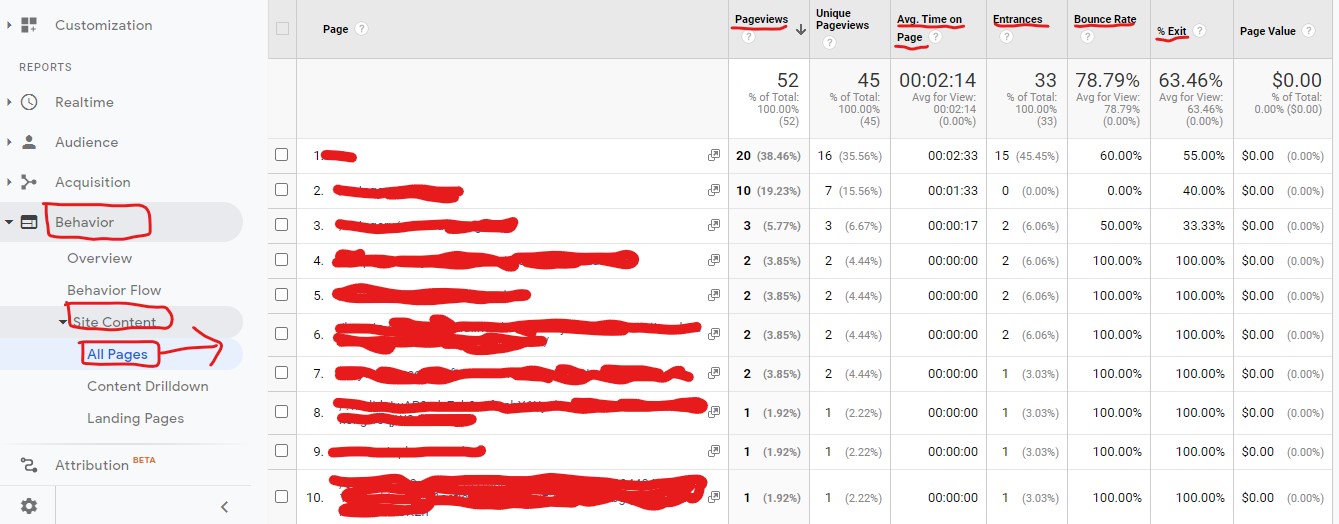
A healthy average time on page indicates that users are spending time on your site going through content. If you have a blog, expect the bounce rate (where a user visits one page and takes no action and bounces away from your site) to be high. The users read the content and leave the site.
Entrances indicate the number of times users landed on the specific page straight from whatever source/medium they used to arrive at your site. It can be search engines, social media post etc.
% exit indicates the rate at which they left the site from that particular page. It is not the same as bounce rate.
Enable Site Search
In the Google Analytics Admin area, click on the gear icon (just below Attribution on the left side bar) to go the Admin section. This is the screen you are presented with.
Click under the right most column named View, the first item called View Settings
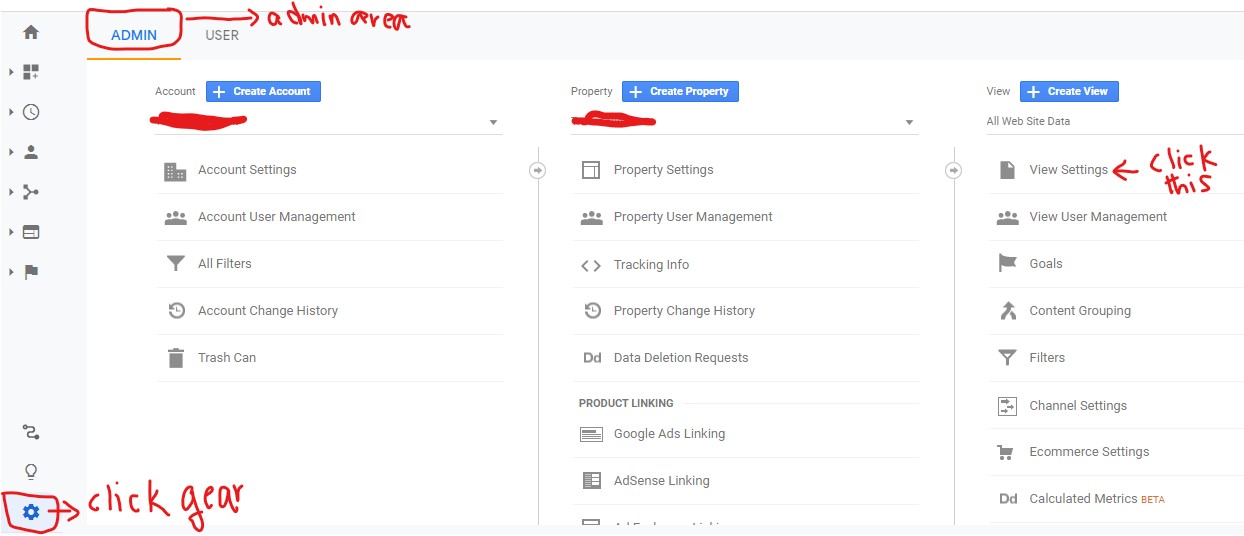
On clicking View Settings, this is where you land
Make sure you set site search parameter to s.
CAUTION: If you are using a CMS other than WordPress, then enter a search term in the search box on your site. Note down the url that brings up the search terms. For example, it could be trafficalingment.com/?p=seo where seo is the search term typed into the search box. In this case, change the query parameter to p within Google Analytics.
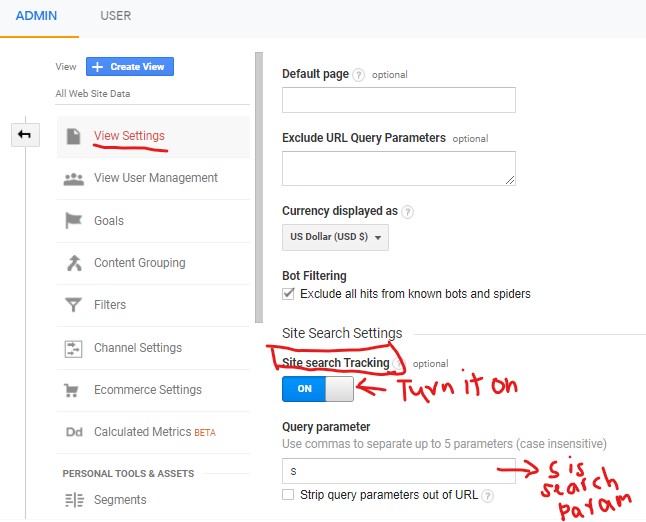
Once this has been done, after site search is enabled within Google Analytics, you can go to Behavior > Site Search > Overview to see what users are searching for on your site.
Here there are two search terms typed in by users.
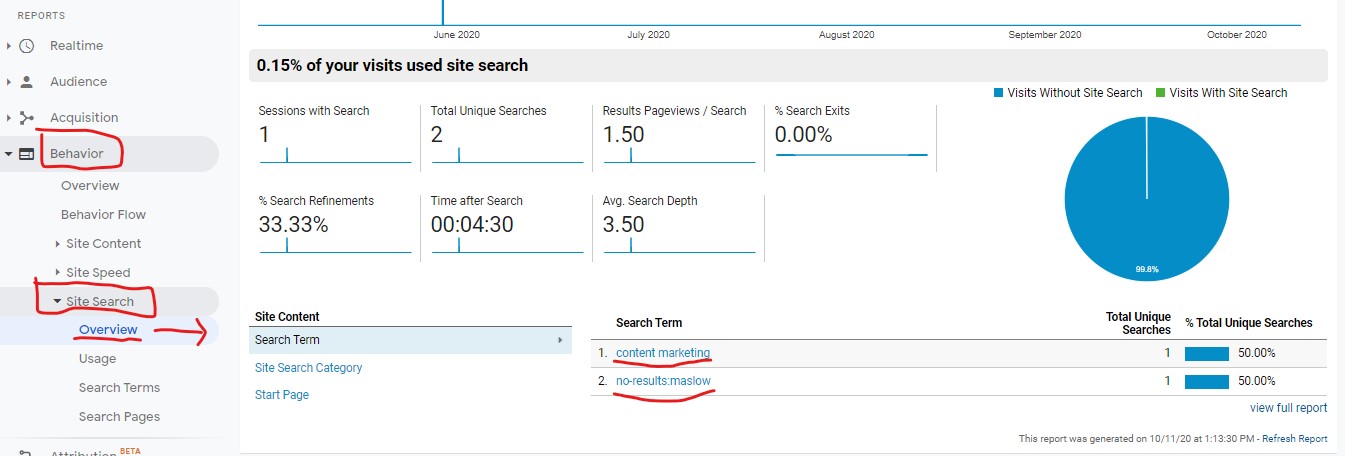
Beware Of Increase in Site Search Terms
If you find excessive number of search terms keyed in by users in the site search box, it also means they are unable to find what they are looking for easily on your site. It is time now to revisit the site structure and analyze it to see where the problems lie, as far as navigating to the content rich pages are concerned.
Sign Up For Google Search Console And Bing Webmaster Tools
Visit Google Search Console and Bing Webmaster Tools . By now, you should have verified your site ownership in both these tools. Go to the sitemap section and paste the sitemap URL (either for the one you have created manually on your site or via the WordPress SEO plugins).
NOTE: If you are creating a sitemap manually (non WordPress site), ensure that you don’t have more than 200 URLs in each sitemap, even if it means you have to create multiple sitemaps for your site to accommodate all the pages.
Site Structure Example
Based on the web hosting example I used to explain keyword research, the same example is being used here to show a simple example of a site structure starting with
Home page optimized for generic keyword phrase web hosting
The second tier pages are the category keywords or short tail keywords
The third tier pages are the destination pages with each page optimized for Tier 3 keywords
This should hopefully give you a good idea of website structure and how it is useful to strike the right balance between human users and search engine spiders.

At Traffic Alignment, we are focused on helping small businesses through content marketing services that are both affordable and also giving greater visibility in the search engines to drive targeted traffic to these sites. Connect with us today!
Related Posts







Leave a Reply