
What Is An SEO Audit Tool?
An SEO audit tool makes the technical analysis of a website much easier by simulating the crawling of search engine bots that spider your website when they find a link to it in the cyber world. For more context, check out the detailed blog post on the topic of website audit
Who Is This Site Audit Tool For?
If you are cash strapped but are determined to run the marathon called Search Engine Optimization, then just as it is vital to know your health parameters if you are really running a marathon in real life, so is the case with SEO. You need an affordable site audit tool to uncover the problems facing your site from a search engine spider’s perspective.
Why Is SEO Audit Important?
Search engine optimization has two important aspects to it – pleasing the human visitor and keeping the search engine bots happy.
User Experience

The first aspect is the user experience when a visitor lands on your site. It comes down to the way your site is structured, the site navigation, the ease with which your visitor is able to find content of her/his choice, the high quality content that keeps the visitor coming back for more, well defined calls to action, all these factors are very important.
Remember that it is a human visitor that is going to buy your product or service and not a search engine bot. It is only fair that you provide a wonderful experience on your website to your visitors who are the backbone of your online presence.
Search Engine Bots

The second and very crucial aspect is the importance accorded to search engine bots that come and crawl your site when ready. This crawling is very vital for your site pages to be accessed and stored by Google.
Once the content quality is of a good standard and reaches a certain page rank threshold, it is admitted into the Google index, a database of millions of pages from sites all over the world. It is from this index that Google selects pages for ranking in response to a user’s search query. There are almost 200+ ranking factors in Google’s algorithm that decides the sites ranked on page 1 of the Google SERPs (Search Engine Ranking Pages)
If your site has technical problems that prevent the search crawlers from accessing its pages, then it makes it very difficult to even get the site crawled. Forget about the site getting indexed and ranked on Google.
As we approach the end of 2020, all the reasons above should help confirm that an SEO audit tool is important for maintaining the health and wellbeing of your site. It can simulate a search engine spider and crawl your site just like Googlebot or Bingbot works. It can unearth a lot of technical data in a very short period of time and lets you analyze the data to find out where the problems lie.
Manual SEO Audit
This is a long and painful process. A Google search for http response headers tool gives you a ton of free tools to check if a page on your site returns a 200 OK, a 404 page not found error or a permanent 301/temporary 302 redirect.
If your site has less than 50 pages, it is well possible you can plug in each and every URL to find out the server response. Imagine a site with hundreds of pages. It is well nigh impossible to check each and every URL manually. Using Chrome Dev Tools can be helpful but it requires lot of technical knowledge.
Speaking of technical knowhow, another drawback is that not everyone who owns a website is well versed in technical SEO. This deals a lot with server responses, server level redirects, content duplication at the domain/sub-domain level, 404 error pages and a ton of other technical stuff. These are not visible on the surface and needs lot of digging in.
Content Duplication At Domain/Sub-Domain Level
My site domain is trafficlaignment.com. I have installed a security certificate and this makes it https://trafficalignment.com I made a firm decision that this root domain will be the final form of my site URL.
If I did not pay attention to this, then I could have different versions of my site, all perfectly valid and not resolving to a fixed pre-determined URL. As an example, the different version http://www.trafficalignment.com (sub-domain), http://www.trafficalignment.com/index.html, https://www.trafficalignment.com and http://trafficalignment.com are all available to Google to crawl and index.
The biggest problem is that each of these different versions of the site URL is considered a different root domain or sub-domain, as the case may be. We are looking at multiple versions of the same content. By definition, if the same content resides at distinct URLs, then it is a clear case of duplication.
Why would Google even spend time crawling the site when there are so many complications? Note that crawling is an expensive exercise in terms of $$$ and Google bots would be better off spending their resources on more healthier sites without these complications.
Solution To Domain Level Content Duplication
Edit .htaccess file and implement 301 permanent redirects
Redirect from a variant of the site home page URL to the fixed root domain version as shown below.
Redirect 301 http://www.trafficalignment.com https://trafficalignment.com
Redirect 301 https://www.trafficalignment.com https://trafficalignment.com
Redirect 301 https://www.trafficalignment.com/index.htm https://trafficalignment.com
Use Redirection Plugin If Using WordPress
After downloading and installing the Redirection plugin, it is a matter of typing the from URL and the to URL in the respective text boxes. The plugin will take care of the permanent redirects.
How Much Does SEO Audit Cost?

SEO site audits are not cheap. In this age of exponential technological advancement, with so many content management systems (CMS), variety of web hosting platforms, multitude of programming languages and Google’s own advanced machine learning algorithms to boot, a website audit should be carried out at least twice a year. It is not abnormal to have a site audit every quarter.
SEO Audit Costs
As you can see, the costs stack up. This is where owning a site audit tool makes sense. Again, the premier tools in the SEO industry today include a smorgasbord of features ranging from keyword research to site auditing. These are industry standard software that come with a high price tag. A highly popular one is Semrush.
There are also subscription service based sites like ahrefs.com, moz.com and hubspot.com that offer a plethora of seo tools of which site audit tool is one. The price tag is really hefty.
Decide If You Want A Premium Tool Or Not
If you are already well established online marketer, it is a no brainer to go in for an expensive tool like SEMRush, moz or Ahrefs. These tools deliver on their promises and perform exactly as they advertise. Again, these are expensive tools.
If you are a beginner or an intermediate wannabe successful online entrepreneur, then an ideal fit is an SEO audit tool like Site Visualizer
Why Site Visualizer?
It is a one-off cost and you do not pay over and over to renew the license. It is a nifty little tool that crawls a site well and has all the useful features that gives you a great insight into the health of your website and where it stands in the eyes of search engine bots.
It unearths enough information to do a good audit of the site and analyze the technical issues plaguing the site. You can download the professional version and test drive it free for 30 days.
I have mentioned a few other site auditing tools in an earlier blog post
Screaming Frog is a great audit tool and has been around for a long time. But it has become expensive over the years and it is now an annual subscription priced at 149 British pounds.
How To Do A SEO Audit Using Site Visualizer?
I will lay out the important features of the Site Visualizer below. Again, it is not the ultimate seo auditing tool out there in the market. But it does justice in what it does at its price point. All the other tools are far more expensive and subscription occurs on a recurring annual basis.
After downloading Site Visualizer, double click the desktop icon for it. On the opening screen, click Project > New to open the Create a New Project screen.
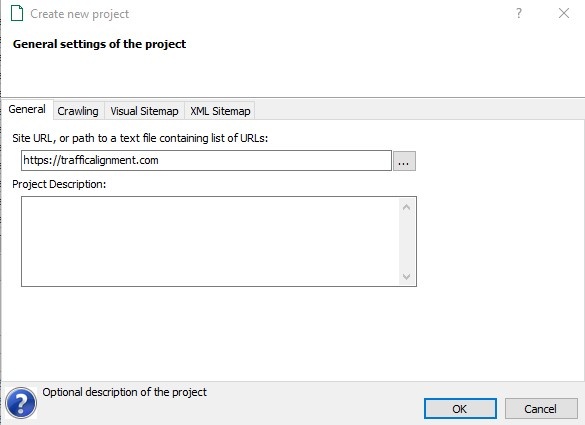
You see 4 tabs General, Crawling, Visual Sitemap and XML Sitemap
Under General tab, put in the site URL as shown – in this case, https://trafficalignment.com, the final resolved URL form of my site.
Let’s now look at the Crawling tab.
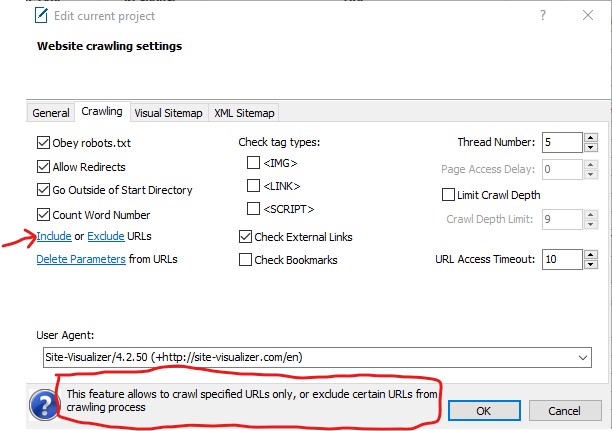
Explanation Of All Above Parameters
Obey Robots.txt makes the Site Visualizer bot obey the instructions in the robots.txt file where you can allow or deny permissions to search bots to specific areas of your site.
Go Outside of Start Directory if checked, allows the entire crawling of your site. If it is unchecked, then you are allowing the bot to crawl only specific directory of the site which you can specify under General tab, as in https://trafficalignment.com/blog/
Checking the Count Word Number option counts the number of words of only the content enclosed within the <body></body> tags. It also excludes the stuff between <script></script> tags.
Leave the default settings as is. I unchecked the <IMG> tag type. Hovering over the link Include gives a hint at the bottom (I have boxed it in red). When you hover over other links, the hint changes accordingly.
Clicking on Include gives the following screen. This is useful when you have a very large site and you want the important areas of your website prioritized initially for crawling. I have prioritized couple of areas.

Clicking on Exclude gives you a dialog box where you can exclude admin areas of your site. If you had a WordPress site, a good place to exclude would be /wp-admin
Delete Parameters helps specify the session id that is set for ecommerce sites. You can also specify product widget and its different colors (typically query string parameters that cause content duplication at URL level).
The tag types, <IMG>, <LINK> and <SCRIPT> if checked, get parsed and are added to the Links table.
The Check External Links checkbox if checked, helps determine if the external links from your site to be broken or not.
Thread Number is the number of parallel threads for crawling a website. Limit Crawl Depth is to do with restricting the depth of URLs crawled. URL Access Timeout is the maximum number of seconds for accessing a URL on a site. Leave them as shown in the screenshot above.
User Agent is the name of the crawler that crawls your site. The default value is Site Visualizer bot. You can change it to Googlebot, Bingbot, Yahoobot and few other bots.
Visual Sitemap Tab
This feature enables you to draw your website’s structure as a set of pages (enclosed in rectangles) and links (denoted by arrows).
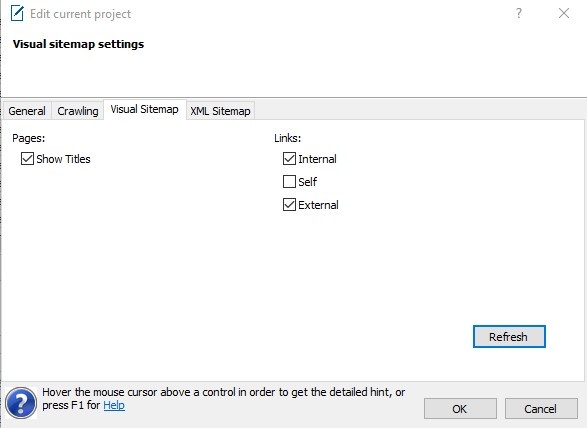
I have checked Titles, Internal and External links to see them in the structure. You can look at it, either one box checked or a couple at a time. Click OK.
Drawing The Visual Sitemap
From the menu, choose Sitemap > Draw.
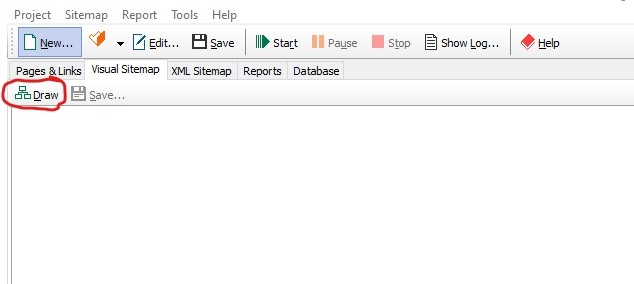
Click the Draw button. The complex diagram shows the home page at level zero and it is drawn first. Every other page is drawn from the home page. Pages are drawn from left to right as their levels increase.
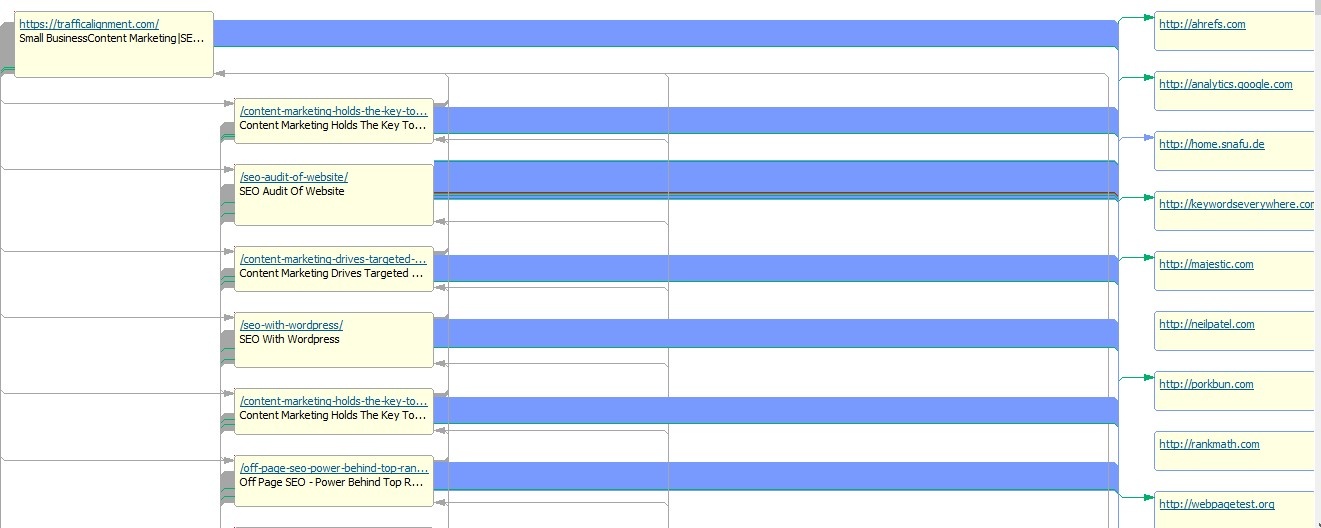
Pages at the same level are drawn top to bottom. Link colors denote different things. You can read a detailed explanation at http://site-visualizer.com/en/visual-sitemap
XML Sitemap Tab
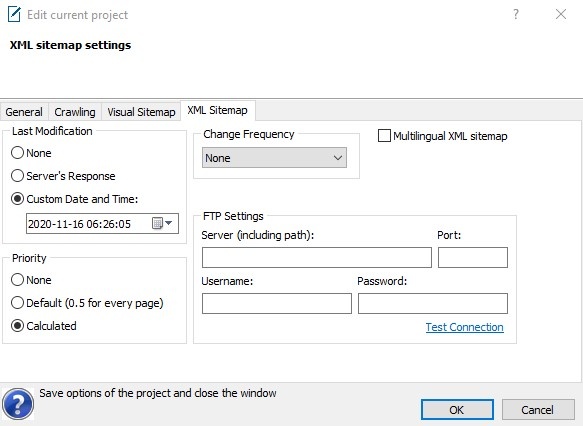
I have not changed any of the default options. Leave as is. Click OK.
Click the XML Sitemap tab to get the following screen
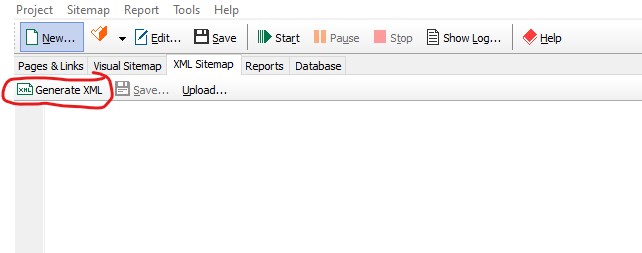
Click the Generate XML tab to generate the XML sitemap of your site.
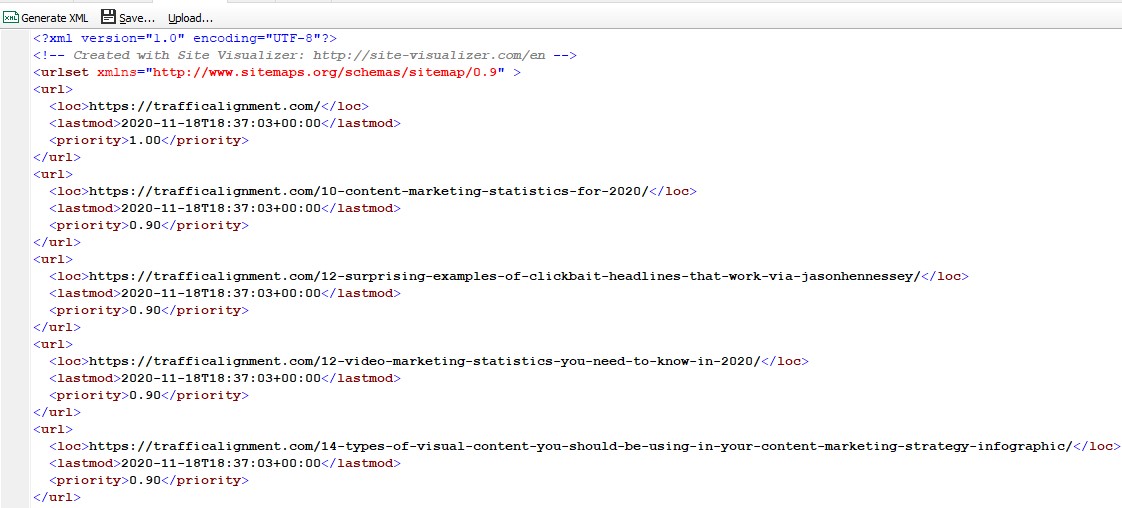
Submit Saved Sitemap To Google Search Console And Bing Webmaster Tools
Click Save to save the sitemap as an xml file to your hard drive. This is the sitemap that you can submit after logging into Google Search Console and Bing Webmasters console. Alternatively, you can use Upload button to send the xml file to your web server after filling in the FTP settings.
Crawl Your Site
It’s time to crawl your site like a search engine bot. From the menu, click Sitemap > Crawl > Start
The Site Visualizer bot crawls and collects all SEO metrics for every URL in trafficalignment.com These include key parameters like Page title, meta tags and their length (in characters). I have enclosed only a portion of the entire image.
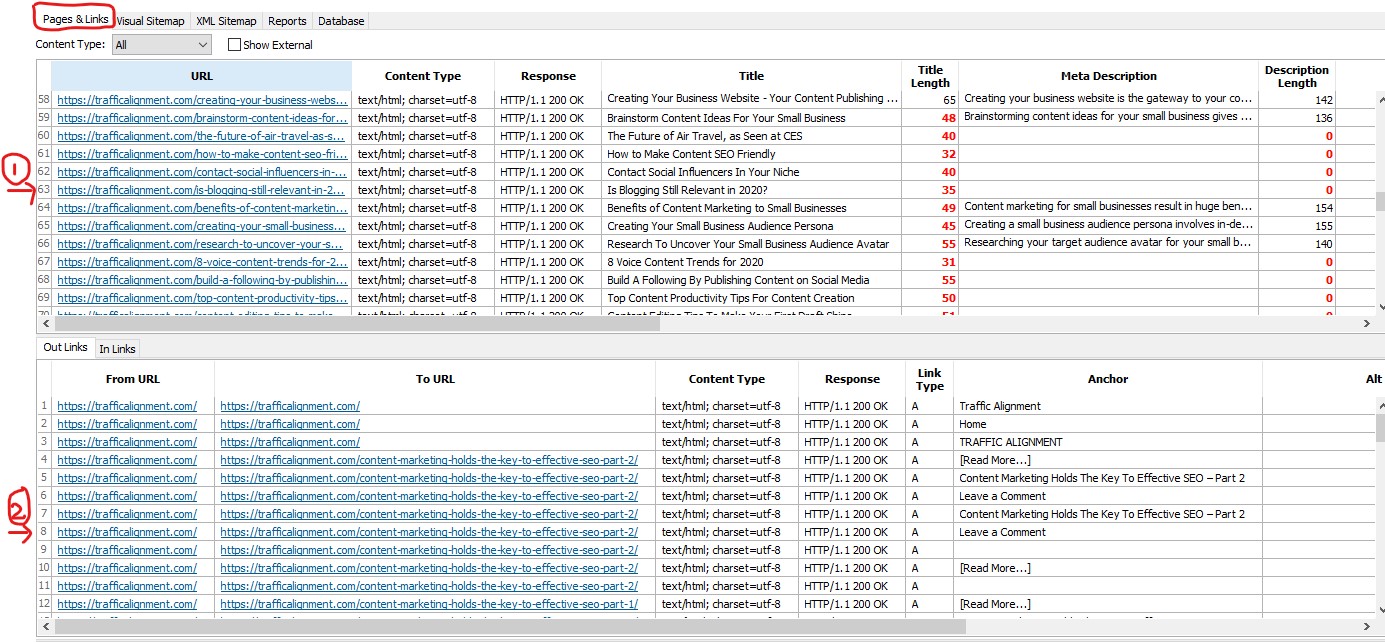
In the screenshot, there are two tables of data. The top table numbered 1 is the table of pages with all URLs and the associated SEO parameters.
The bottom table numbered 2 is the table of outbound links and inbound links for a specific page URL selected in table 1. In this example, the URL in table 1 is the home page. You can select any URL of your choice.
The Outlinks tab shows all the links going out from the home page. The Inlinks tab shows all the links coming into the home page URL.
Key Features Of Site Visualizer
Broken Links Checker
To view all the inbound and outbound broken links from the site, click on the Reports tab. There are a variety of reports to delve into.
Double click the Client Error Responses report.
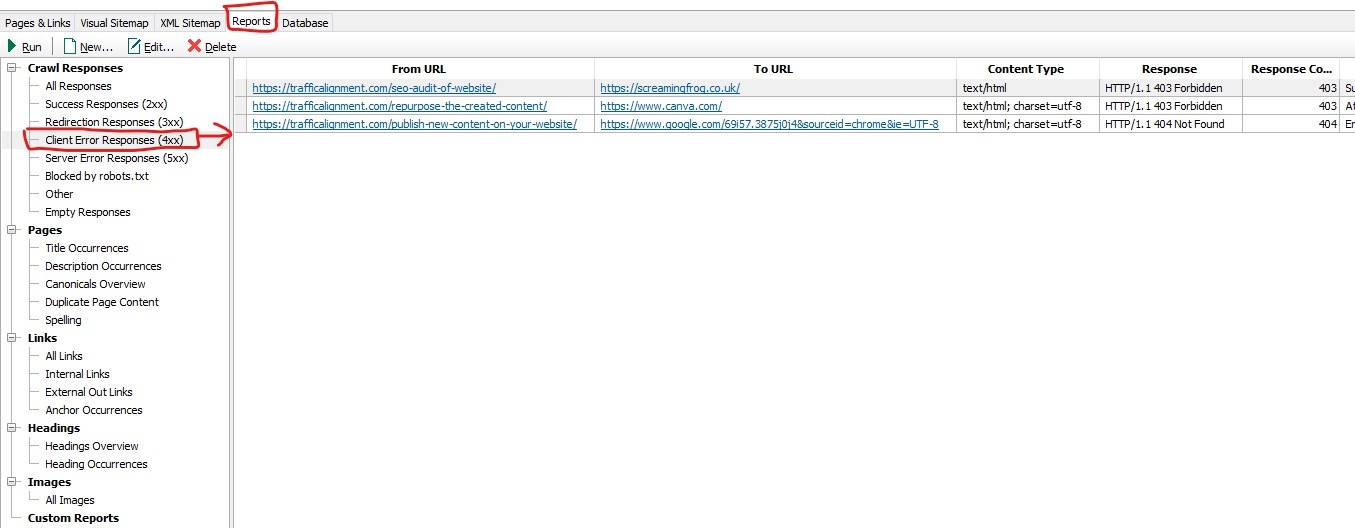
On my site, I have three external link errors. Either they have not been linked to correctly or the link URL has changed. These are all outbound links from my blog posts. It is only a matter of fixing these errors.
Duplicate Content Checker
Duplicate content can invite penalties from major search engines. This report highlights the duplicate content on my site.
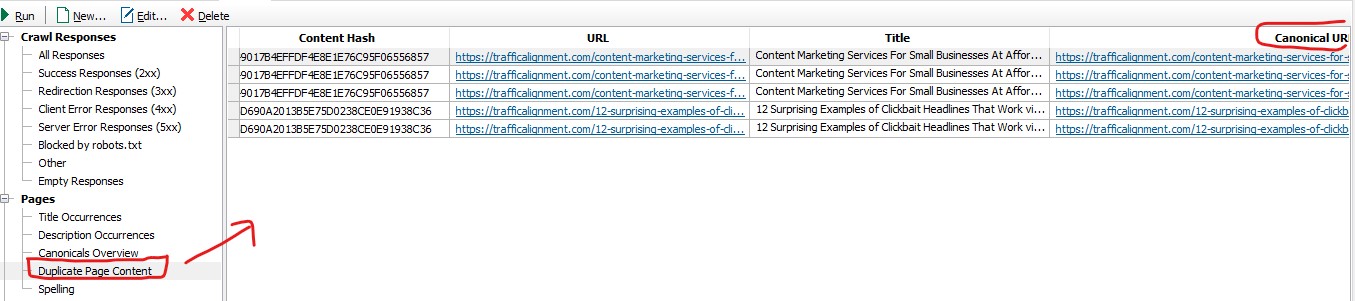
Although I have five items listed, I have circled the column Canonical URL which in effect means all these variations point to the most representative single URL. This tells the search engine spiders that the canonical URL is the most representative URL these duplicate URLs point to, as a result of the content hash.
This report also shows pages with duplicate page titles and meta descriptions. Headings from h1 to h6 are also included.
Google Index Checking Tool
To see all the pages on your site that are residing in the Google index, from the menu, select Tools > Google Index. You can see all the URLs in the Google database for various options such as indexed and crawled, crawled but not indexed etc.
Combine Crawled Data With External Data
Go to Tools > Import Data to invoke the Import Wizard tool.

A Site Import Wizard dialog box appears where you can import into Site Visualizer, data from a third party tool like Google Analytics or Google Search Console, in the form of a txt file. You can combine the imported data with the crawled data using an SQL Query.
For detailed documentation, visit these links
http://site-visualizer.com/en/tools/import-data
http://site-visualizer.com/en/database
Custom Defined Reporting
Most SEO audit tools have a pre-determined set of site reports. Site Visualizer is unique in that it lets you create a website report that is not built in.
From the menu, click Reports > New to arrive at the screen titled Create New Custom Report
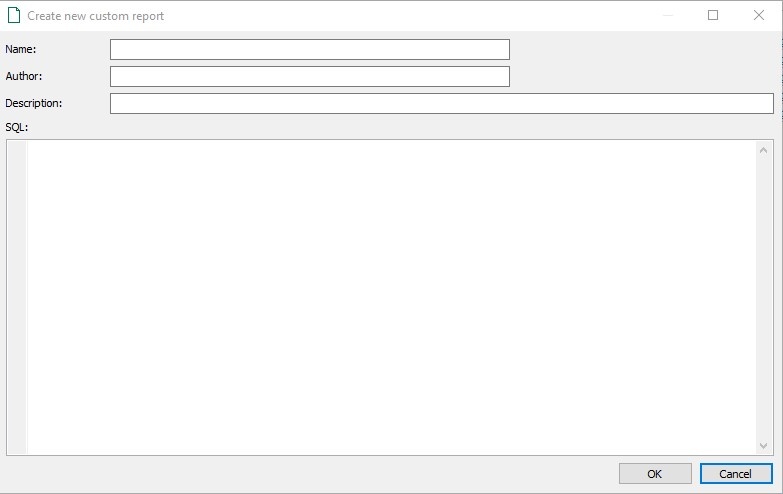
Now, you can create a report that finds duplicate H1 tags. You need to know SQL and also how to use Site Visualizer’s database to use SELECT statements and create JOINs.

For more instructions, refer to http://site-visualizer.com/en/reports/custom-report
Redirects and Server Errors Checker
Under Reports, double clicking the All Responses report gives the different response codes and the number of URLs on the site affected by it.
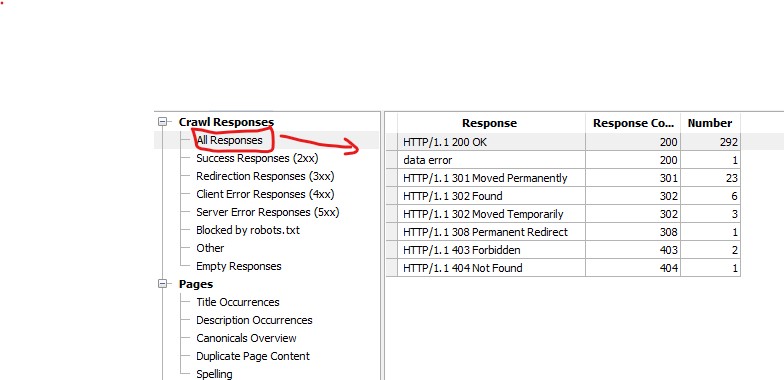
200 OK stands for correct response code 200. Redirection responses shows all the URLs that are either 301 permanently redirected to another destination or 302 temporarily redirected (which search engines frown upon).
Client error responses are critical especially the 404 page not found error. These have to be fixed immediately. The Server error responses are the 500 errors that occur when web server is down. Example is 502 bad gateway error. Blocked by robots.txt are the areas of your site that you have blocked spiders from crawling.
Site Visualizer Offer Special Services For Free
If you think this SEO audit tool is so reasonably priced compared to the rest of its competition, you will be amazed to learn that if you have problems writing SQL code to join your site crawl data with third party data like Google Analytics or Google Search Console, Site Visualizer will do it free of charge for you.
Even if you don’t know the database structure of the Site Visualizer database, once you contact them and get their help, you can write SQL queries to join your custom data with third party data going forward.
Is Site Visualizer SEO Audit Tool Worth It?
If you look at all the tons of standard and advanced features available in this tool, you would be crazy not to test drive it. I am sure you will appreciate the powerful features of Site Visualizer, too many of them I have not listed here.
If you are happy, you cannot go wrong with a one time payment for life with continued upgrades and support. Do not take my word for granted. Test it yourself and decide!!
Here at Traffic Alignment, we give maximum priority to our clients’ business well-being and the advances made by their small business in the online space. Our small business content marketing services will give your business a leg up combined with a modest social media ad spend. Contact us today!!
Related Posts












Leave a Reply