
What Is SEO Audit Of A Website?
An SEO audit of a website involves an in-depth review of that site in the context of automated programs called search engine crawlers being able to spider your site with least amount of time and effort without encountering obstacles (deliberate and those created by mistake).
Why Only Two Major Search Engines?
There are only two major search engines left today, namely Google and Bing and Yahoo a distant third. In the early days of the web, there were several search engines, the prominent ones being Alta Vista, Lycos, Ask, AOL to name a few. The massive cost of crawling the web and indexing the exploding number of websites caused severe financial constraints leading to ultimate demise of most of the pioneering search engines.
Roll Out The Red Carpet To The Bots
When you build a site, ensure that the structure of the site is clean, the navigation is clear and the internal linking of the site determines a clean site hierarchy. By doing an exhaustive SEO audit, we uncover the problems (especially technical SEO) that prevents the spiders from crawling the website effectively.
The bots stay clear of sites with redirect loops (series of redirects). The bots do not trust such sites and avoid crawling them. If we make life difficult for the crawlers by creating technical roadblocks, then getting indexed and ranked on the search engines is next to impossible.
Google Webmaster Guidelines
Google has always emphasized on guidelines that help it find, index and rank websites. The guidelines are categorized into General (to help Google find, understand and help visitors use your web site pages), Quality (to prevent abusive and manipulative behavior through a variety of malpractices) and Specific (avoiding well defined specific negative techniques). The guidelines in their entirety can be found at https://support.google.com/webmasters/answer/35769
Google’s attitude until 2012 was that it expected webmasters and site owners to follow these guidelines in good faith. But severe violations of these guidelines by spammers and almost anyone willing to take a chance, almost rendered Google search results useless with low quality spammy sites dominating page one rankings, leaving uses frustrated and rendering Google’s very algorithm meaningless.
This made Google enforce the guidelines in 2012 through Panda and Penguin updates which rocked the cybersphere and shook it up in never before seen ways. Google has since been forced to act as robocop to maintain the sanctity of its search algorithms and hence the search results to provide the best user experience to searchers by returning most relevant results to search queries.
This has leveled the playing field, with Google refusing to admit poor quality sites into their index. All manipulative schemes like link farms, blog networks, auto generated content have all been rendered ineffective by Google’s superior machine learning algorithms.
It’s very hard to manipulate the rankings today. Those that do, manage to rank for a short while before Google catches up and decimates them.
Follow The Webmasters Guidelines In Letter And Spirit
Let us look at SEO audit of a site in the context of Google’s own guidelines for webmasters.
1. General Guidelines
Ensure all pages on a site can be reached via a link
The search engine crawlers should be able to follow links on each page of the site to other pages. These links are typically <a> tags with the href attribute. An example would be
<a href="https://trafficalignment.com">Traffic Alignment Home</a>.
The crawler will look at the clickable anchor text, in this case, Traffic Alignment Home placed between the <a> and </a> tags. The anchor text gives the crawler an idea of what kind of page the link is pointing to, even before it has crawled that page.
Alt Tag For Images
For images, since bots cannot understand images (not entirely true as latest machine learning algorithms enable search engines to know a lot more), an image has an alt attribute as in
<img src=”laptop.jpg” alt=”Laptop” width=”300″ height=”300″>
The alt attribute tells the crawlers (and visually impaired users browsing the site) that the image represents a laptop. There is also a title attribute that displays the word laptop when the image is hovered over.
Use a Sitemap
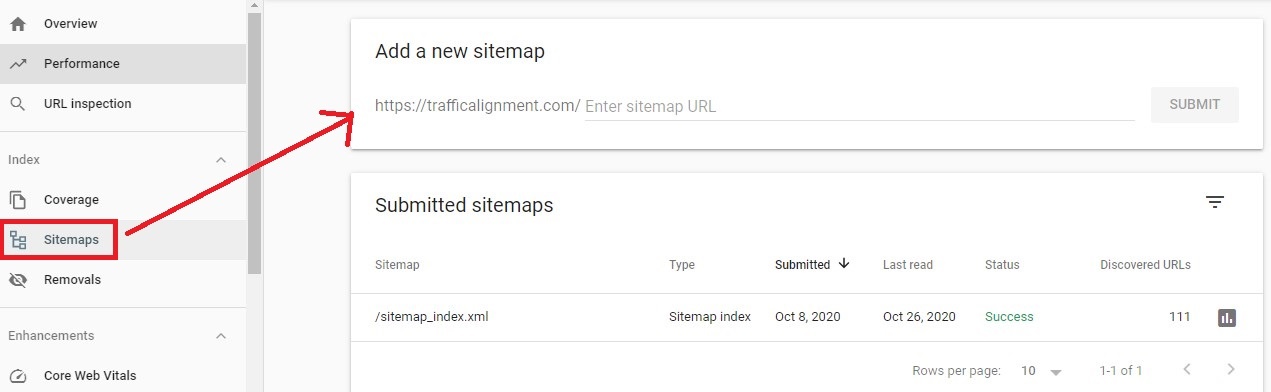
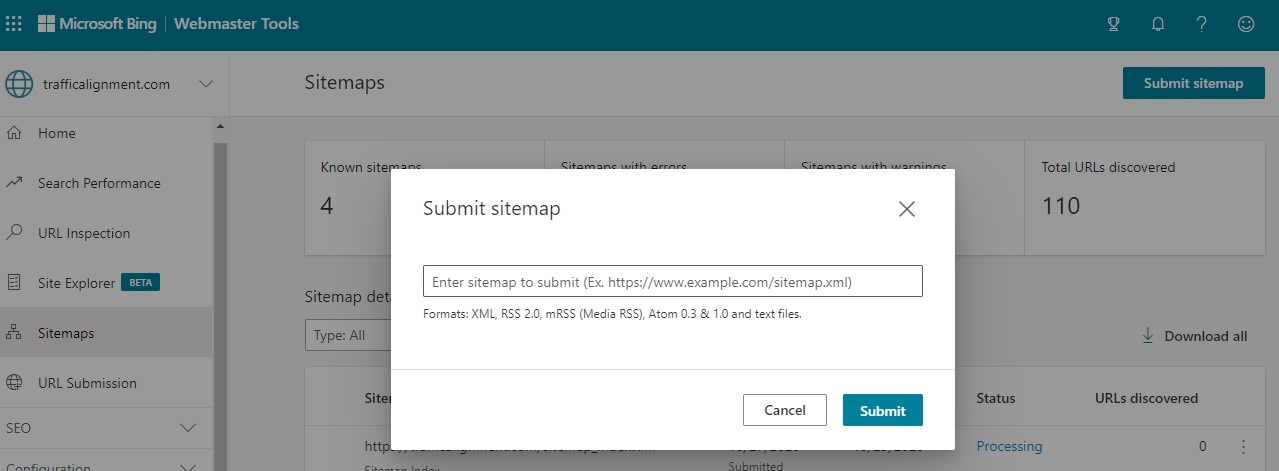
Sitemap is a file that has links pointing to all pages of the site. This file helps crawlers find all the pages on your site. You can submit a sitemap through the Google Webmasters Console and Bing Webmasters Tools
For non-Wordpress sites
There are free sitemap generators available that can be used to submit the sitemap as an xml file. This is ideal for small sites. It is difficult for sites with large number of pages as free tools have a hard restriction on maximum number of URLs that can be submitted. A good tool can be found at https://www.xml-sitemaps.com/
For WordPress Sites
RankMath is an awesome plugin that generates the sitemap automatically. Copy the generated sitemap URL and paste it into the Google and Bing webmasters consoles.
Google Webmasters Console Sitemap Submission
Bing Webmasters Console Sitemap Submission
Help Crawlers Save Time And Money
Server Support For If-Modified-Since HTTP Headers
The bots send this request-header to the web server hosting the site even before they begin crawling it.
If the response from server is a 200 status code, the requested document is updated and the crawler knows that the document has changed since its last visit, displayed by the timestamp the browser last downloaded this resource. It either downloads it in the same visit or schedules it for a later visit.
If the response from server is 304 Not Modified status code, then the crawler knows the document has not changed since its last visit and does not download it.
Use Robots.txt file
The robots.txt file contains directives that tell search engine spiders what areas of the site are allowed to be crawled and what areas are blocked. This lets them schedule their resources effectively for optimized crawling of the site. Good bots will obey these directives. Rogue bots couldn’t care less.
The robots.txt file is uploaded to the web server and is placed in the root directory. The URL is typically www.yoursite.com/robots.txt
Testing robots.txt
Use the URL Inspection Tool within the Google Webmasters Console to see the Google indexed version of the page. You can see various errors like structured data errors, indexing problems etc.
In general, if you see problems with pages not being indexed from your site, the URL Inspector tool is your best friend to troubleshoot such issues.
2. Site Content To Help Google Understand It Better
On Page Optimization
Effective on page optimization helps Google get a good idea of what your website is all about. The key to this is well defined content hierarchy, starting off at the top with the home page, then flowing to the next tier of category pages and finally the third tier of rich content or money pages (for ecommerce sites).
Each page on the site should have a good title, a crisp and clear meta description and clear information hierarchy of content split into headings and sub-headings via h1, h2, h3 tags.
All images should similarly have good descriptive alt tags and relevant file names that describe what the image is about. There are best practices for videos and structured data.
It is very important to make content visible, especially to humans. Gone are the days of content cloaking when depending on the type of search spider, spammers would show specific content just to the bot which is otherwise hidden to the human user.
User Experience On Your Site Is Vital
Validate the HTML by running it through a W3C Markup Validator Errors in the code can affect the search engine friendliness of your site, preventing it from ranking well.
Page Load Speed
Page load speed is one of the most crucial factors for ranking websites. For WordPress sites, this is extra important as a slow loading page will not make the cut as no user will wait patiently for the page to finish loading. They are going to exit the site at the speed with which they landed in the first place.
A good WordPress plugin is Autoptimize that caches Javascript and CSS files. If your web hosting plan lets you connect to the Cloudflare CDN, that is a huge fillip to hasten your page load speed. Page caching is a huge asset and the CDN displays cached pages to visitors from different parts of the world.
Check out your page load speeds at Pingdom or Webpagetest In my experience, Google Page speed Insights can be quite complex to understand the results.
Responsive Sites
Most WordPress themes are responsive out of the box. That is a huge advantage. Mobile device users outnumber desktop users. Google knows how crucial page load speed is for mobile browsers. You cannot afford not to have a mobile friendly website today.
Browser Compatibility
Check how your site displays in different mainstream browsers. There are really good tools available, mostly paid. Most offer a free trial. Popular sites include BrowserStack (paid) and Browserling (free and paid)
Encrypt Your Website
Make sure you use the https protocol. This is known to give a slight ranking boost when it comes to everything else being equal. Moreover, Google would warn users from going to a non-secure site which is a bad user experience for anyone visiting your site.
Almost all web hosting companies offer encryption for even low priced hosting plans.
3. Quality Guidelines
These deal with deceptive and manipulative behavior. If Google deems fit to determine an activity as one of malicious intent, then it is illegal. Site owners implementing black hat and gray hat techniques are bound to suffer. SEO is not a sprint but a long marathon. Every one’s actions is bound to catch up with them sooner than later.
Spam Report
Google encourages webmasters to report any site indulging in malpractices through an online spam report complaint form. It can be web page spam, paid links spam, rich snippets spam, malware or phishing. More details can be found at https://support.google.com/webmasters/answer/93713?utm_source=wmx&utm_medium=deprecation-pane&utm_content=spamreport&visit_id=637394476498511193-2783730779&rd=1
Refrain From These Malpractices
- Do not create web pages crammed with keywords that are submitted to the search engines via a sitemap but invisible to humans. Build pages for human visitors with good quality content. This is also a classic case of cloaking content.
- Avoid rehashing content by using article spinners to create variations of a good quality piece of content. Building backlinks using article spinners used to be the flavor of the day in the past to rank new websites.
- Avoid blog networks and auto blogging sites at any cost. These only create low quality spammy sites that are of no use to anyone, other than getting Google to clean up.
- Affiliate marketing is a billion dollar industry. It is not a sin in itself to have a site promoting affiliate products. Google devalues affiliate links unless there is great content to go along with it. Describing the problem and offering a clear solution via an affiliate product is a good way to think about it.
Google can take manual action against a website for a violation at any level. The more severe the crime, the more intense the punishment.
Security And Manual Actions
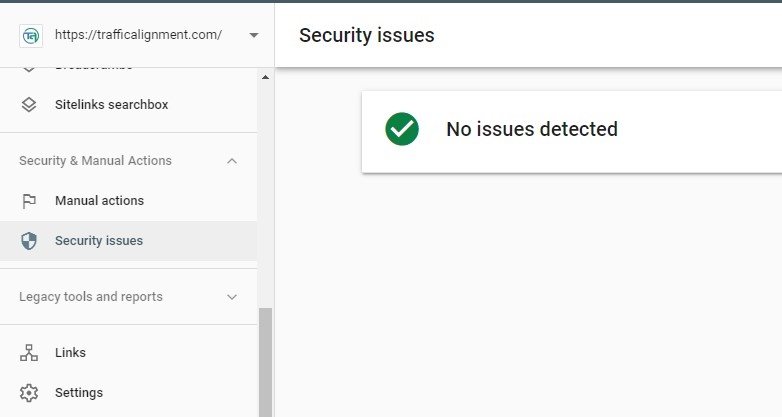
Inside the Google Webmaster Console, there is a section called Security & Manual Actions.
Keep checking them periodically. Clicking on Manual Actions shows if you have been hit by a Google penalty.
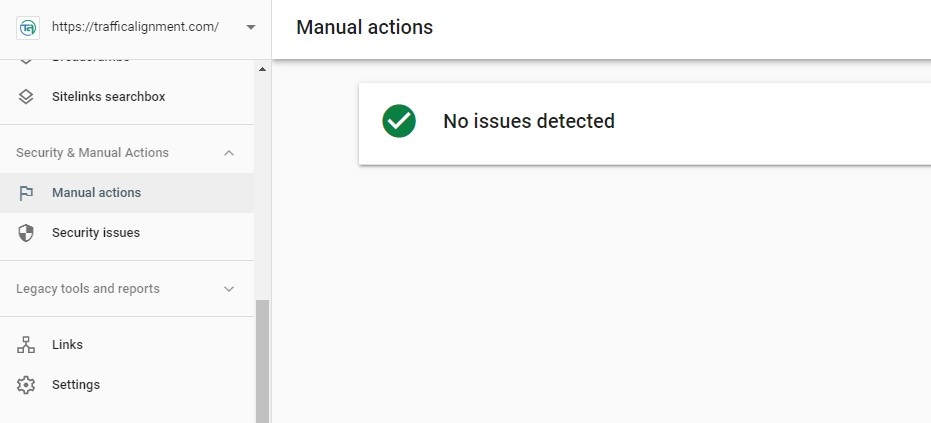
Hacking of sites, especially WordPress sites with vulnerabilities, arising due to not updating the theme or outdated plugins no longer in use, can be damning and cause headaches for both site owner and Google. Google can issue a warning notice when visitors try to click on a site that has been hacked.
What Is Technical SEO Audit?
A technical SEO audit involves behind the scenes technical activities that affect the search bots and their crawling and indexation. These can include:
-
Resolution of site URL to avoid content duplication
This is achieved by ensuring that the http version of http://trafficalignment.com is redirected permanently to https://trafficalignment.com
Another variation is the www version of http://www.trafficalignment.com and https://www.trafficalignment.com resolving to https://trafficalignment.com
In these examples, I have chosen https://trafficalignment.com to be my base site URL. Resolving this accounts for solution to at least 50% of duplicate content issues on a site.
-
Crawling Your Site
If you are starting on a shoestring budget or with no budget, sign up to Ahrefs using your Gmail account. The paid version is an awesome tool. But the free version does a thorough crawl and shows the errors the search engine crawlers see when spidering your site. These can range from 404 page not found errors to broken links, duplicate content, page redirects etc.
In a future post, I will do an SEO audit using an auditing tool.
-
On Page Optimization
These include on page factors like page title, meta description, the <h1> headline tag, other sub-headings that determine the content hierarchy (this gives the bots a decent idea of what your site and its content is about), the internal linking structure and the site hierarchy (home page, category pages and money pages). Refer to this article.
-
Check Backlinks Profile
Log into your Google Webmasters Console and check the backlinks to your site. Do this once a week and make it a mandatory activity. You can attract backlinks from bad neighborhood for no fault of your own. Your competitors can be adopting the PPC (Porn, Pills and Casino) strategy to tank your site by pointing poor quality links.
Either way, you have to be vigilant and disown such links at any cost. Even poor quality links (not PPC domains) which are not related to your niche should be removed. Some of them may be related to your niche but can be from blog comments or forum profiles. Ensure you remove them without showing mercy. This is to protect your site from all possible dangers as this is a long drawn out game.
-
Prevent Your WordPress Site From Getting Hacked
WordPress is the most popular Content Management System (CMS) out there. It has security vulnerabilities brought about by owner’s carelessness in not upgrading and updating WordPress and its theme to the latest version. It is also caused by old plugins that are no longer being updated by the developer.
Either way it is your duty to make sure you keep everything clean and up to date. The best thing you can do is select a hosting plan that offers Cloudflare hookup. By connecting to a CDN, you not only prevent hack attacks but also speed up the pages by effective caching. It is like killing two birds with one stone.
Also, have a good free plugin like Antispam Bee (now that Akismet comes only in paid version). This is absolutely vital to clean up spam comments on your blog. If unchecked, auto approving comments can lead to your site’s downfall.
What Are SEO Audit Tools?
SEO audit is a manual process that can consume time and effort. There are variety of software available to automate the SEO audit process. It reduces the time taken and also of a structured format so you don’t miss checking on something important.
SEO Audit Software
A good choice, as mentioned above is ahrefs. You can start off with the free version. Once you gain momentum, a paid subscription to Ahrefs is well worth it, although it does not come cheap.
Limited Free SEO Audit Tool
If you have a small website, less than 500 URLs, you can use Screaming Frog This is a great audit tool and gives you a clear insight into the errors spiders encounter when crawling your site. A paid annual subscription comes in at GBP 149 pounds.
Totally Free SEO Audit Tool
Xenu’s Link Sleuth has been around since the Web started. The popular belief is that it is a broken link finder tool. But it is much more than that. You can get useful data like status code of pages crawled and the title tag of pages.
Refer to a novel way of using Xenu to get better idea of how your site appears to the search bots.
Conclusion
An exhaustive SEO audit should be done at least once every six months. It is easier to spot problems arising from Google updating its algorithms all the time. Site owners should be extra vigilant against hacking attempts. They should also be watching their backlink profile regularly. Do not indulge in black or gray hat activity. Use of software audit tool makes life easier.
At Traffic Alignment, we specialize in content marketing services for small businesses by using a modest paid social advertising budget in conjunction with content optimization to help businesses have greater visibility on the web. Give us a call today!
Related Posts










Leave a Reply